Retry Strategies for AWS SDKs: Best Practices
Compare Standard, Adaptive and Legacy retry modes and get practical SDK configuration tips for Java, JavaScript and Go to boost reliability and control costs.
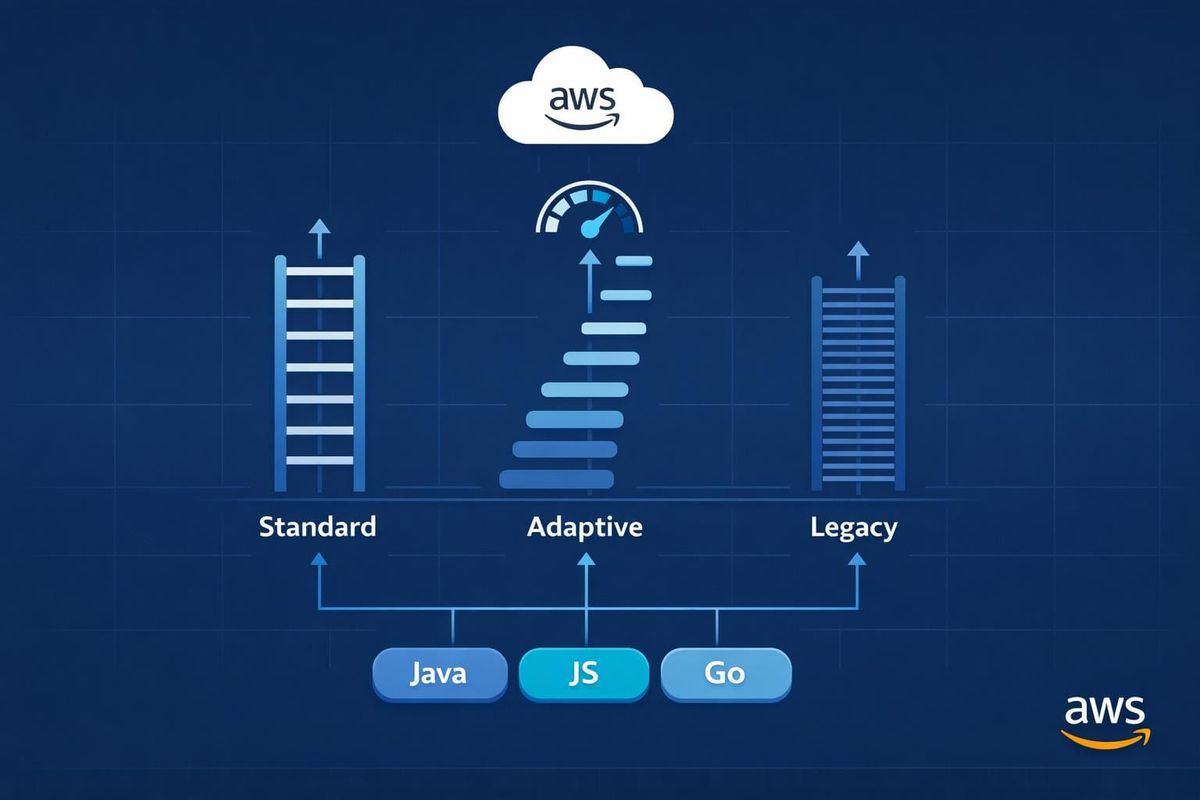
When using AWS SDKs, retries help manage temporary errors like throttling (HTTP 429), network issues, or brief service outages. AWS SDKs come with three built-in retry modes:
- Standard Mode: Default for most cases. Uses exponential backoff with jitter to space out retries and prevent overwhelming AWS services. It caps retries at 3 attempts and includes circuit-breaking via a token bucket system.
- Adaptive Mode: Adds client-side rate limiting to adjust retry rates dynamically based on error patterns. Useful for resource-limited environments but requires careful client setup.
- Legacy Mode: Outdated and not recommended. Lacks modern protections like token management and uses less effective backoff strategies.
Key Takeaways:
- Customisation: You can fine-tune retry settings (e.g., max attempts, delays) in SDKs like Java, JavaScript, and Go to suit your application's needs.
- Cost Control: Properly configured retries prevent unnecessary API calls, reducing AWS bills during outages.
- Best Practice: Ensure operations are idempotent and avoid infinite retries to maintain reliability and control costs.
Choosing the right retry mode depends on your application's requirements. For most users, Standard Mode is sufficient, while Adaptive Mode suits scenarios with tight resource constraints. Avoid Legacy Mode for new projects.
AWS Concept Review - Timeouts Retries Back-off Jitter
sbb-itb-0f2792e
Built-in Retry Strategies in AWS SDKs
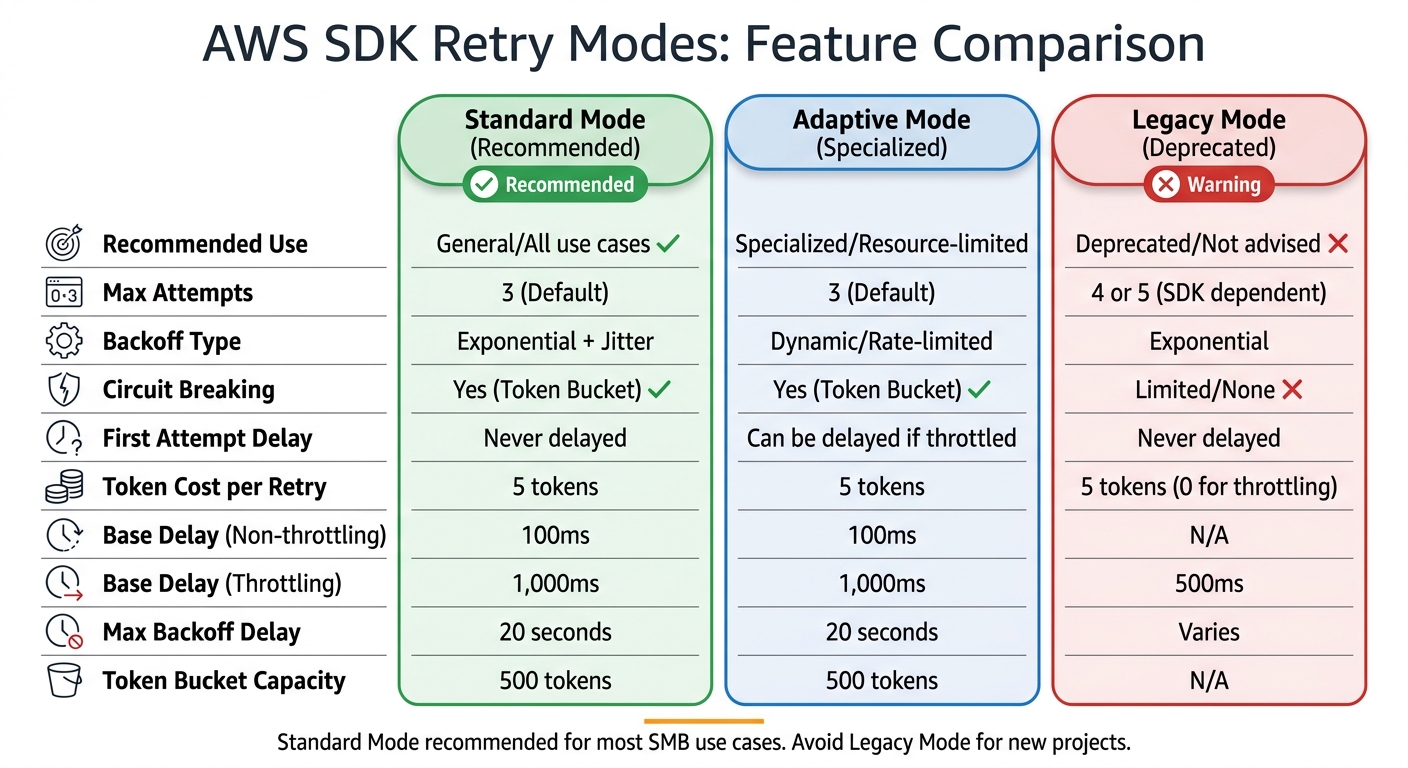
AWS SDK Retry Modes Comparison: Standard vs Adaptive vs Legacy
Let’s dive into how the built-in retry strategies in AWS SDKs function. These SDKs offer three retry modes, each designed to handle specific error scenarios.
Standard Retry Strategy
Standard mode is the default and works well for most use cases. It uses exponential backoff with full jitter to space out retry attempts in a way that reduces the chance of overwhelming services.
This strategy differentiates between error types to calculate delays. For non-throttling errors (like HTTP 500 or 503), the base delay is 100 milliseconds. However, for throttling errors (like HTTP 429), the base delay increases to 1,000 milliseconds. This longer delay for throttling errors helps ease the load on already stressed services.
A token bucket system (with a capacity of 500 tokens) controls retries. Each retry consumes 5 tokens, while successful requests replenish tokens. If the bucket runs out - typically during extended outages - the SDK halts retries entirely, avoiding "retry storms" that could harm both your application and AWS services. The maximum delay for backoff is capped at 20 seconds.
"Retries are 'selfish.' In other words, when a client retries, it spends more of the server's time to get a higher chance of success." - Marc Brooker, Senior Principal Engineer, AWS
Adaptive mode builds on this by adding dynamic rate limiting.
Adaptive Retry Strategy
Adaptive mode takes Standard mode a step further by introducing real-time client-side rate limiting. It adjusts request rates dynamically based on current error rates and latency, slowing down requests to align with the service's available capacity. Unlike Standard mode, Adaptive mode can even delay the first request if it detects throttling patterns.
This mode is particularly useful when working with limited resources, such as a single DynamoDB table. However, if a single client handles multiple resources, throttling on one resource could delay requests for others.
"Adaptive mode assumes that you are pooling clients based on the scope at which the backend service may throttle requests. If you don't do this, throttles in one resource could delay requests for an unrelated resource." - AWS Documentation
To avoid this, use separate client instances for each resource when employing Adaptive mode. Recent updates to the Java SDK (v2.26.0+) introduced ADAPTIVE_V2, which rectifies earlier issues where initial requests weren't properly delayed when throttling occurred.
On the other hand, Legacy mode lags behind in terms of safeguards and is mainly kept for compatibility.
Legacy Retry Strategy
Legacy mode exists only for backward compatibility and is not recommended for new applications. While it uses exponential backoff, it lacks the robust protections of the newer strategies. For example, it doesn't consume tokens for throttling errors, which can lead to resource exhaustion during outages.
In Legacy mode, the base delay for throttling is 500 milliseconds (compared to 1,000 milliseconds in Standard), and it allows 4 retry attempts instead of the default 3. These differences make it less effective at managing resources and protecting downstream services.
If you're still using Legacy mode, switch to Standard or Adaptive for better resource management and improved protection for your applications and AWS services.
| Feature | Standard | Adaptive | Legacy |
|---|---|---|---|
| Recommended Use | General/All use cases | Specialised/Resource-limited | Deprecated/Not advised |
| Max Attempts | 3 (Default) | 3 (Default) | 4 or 5 (SDK dependent) |
| Backoff Type | Exponential + Jitter | Dynamic/Rate-limited | Exponential |
| Circuit Breaking | Yes (Token Bucket) | Yes (Token Bucket) | Limited/None |
| First Attempt | Never delayed | Can be delayed/throttled | Never delayed |
| Token Cost (Retry) | 5 | 5 | 5 (0 for throttling) |
These retry modes create a solid foundation for further customisation within specific AWS SDKs, which we’ll look at next.
Customising Retry Strategies for Different SDKs
Fine-tuning retry strategies lets you adapt AWS SDK behaviour to meet your application's specific performance requirements. By building on the default retry mechanisms, you can optimise both performance and manage AWS costs effectively, especially for small and medium-sized businesses (SMBs). Each AWS SDK offers its own methods for customisation, ranging from simple parameter adjustments to implementing entirely custom logic.
Customising Retry Strategies in the Java SDK
For the AWS SDK for Java 2.x (v2.26.0+), you can configure the RetryStrategy when constructing a client. This involves setting parameters like the maximum number of attempts and adding custom exceptions to the retry logic. Here's an example:
DynamoDbClient client = DynamoDbClient.builder()
    .overrideConfiguration(o -> o.retryStrategy(
        b -> b.maxAttempts(9)
              .retryOnException(MyCustomException.class)
              .retryOnExceptionOrCause(WrappedException.class)))
    .build();
The retryOnException method adds exceptions to the list of retryable errors without replacing the defaults.
You can also customise backoff timing. By default, non-throttling errors have a base delay of 100 milliseconds, while throttling errors start at 1,000 milliseconds, with a maximum backoff of 20 seconds. To modify these values, you can use the BackoffStrategy:
BackoffStrategy backoff = BackoffStrategy.exponentialDelay(
    Duration.ofMillis(200),
    Duration.ofSeconds(30));

DynamoDbClient client = DynamoDbClient.builder()
    .overrideConfiguration(o -> o.retryStrategy(
        b -> b.backoffStrategy(backoff)))
    .build();
Since DynamoDB clients default to 8 attempts, it's important to create a unique RetryStrategy for each client to better control retries and manage costs effectively.
Customising Retry Strategies in the JavaScript SDK
For modern retry capabilities, it's recommended to use the JavaScript SDK v3. In this version, you can set the retry mode globally by using an environment variable or the AWS config file:
export AWS_RETRY_MODE=standard
Or, in the AWS config file:
[default]
retry_mode = standard
The standard mode, suitable for most use cases, defaults to 3 attempts in total (1 initial request plus 2 retries).
If you're still working with SDK v2, you can tweak retry settings by passing retryDelayOptions to the service client constructor. For example, to adjust the base delay:
const s3 = new AWS.S3({
  retryDelayOptions: {
    base: 200  // milliseconds
  }
});
For advanced control, you can implement a customBackoff function that determines delays based on the retry count and error object. However, adaptive mode should be avoided unless your application operates in a resource-constrained environment and isn't highly sensitive to latency. Adaptive mode is experimental and requires separate client instances for different resources.
Customising Retry Strategies in the Go SDK
The AWS SDK for Go v2 uses retry.Standard as its default retryer. This comes with 3 maximum attempts, a 20-second maximum backoff delay, and a 500-token rate limiter capacity. To customise the retryer, you can use helper functions. For instance, to increase the maximum number of attempts:
retryer := func() aws.Retryer {
    return retry.AddWithMaxAttempts(retry.NewStandard(), 5)
}

cfg, err := config.LoadDefaultConfig(context.TODO(),
    config.WithRetryer(retryer))
To add retryable error codes, use retry.AddWithErrorCodes. Here's an example for retrying S3's NoSuchBucketException:
retryer := func() aws.Retryer {
    return retry.AddWithErrorCodes(
        retry.NewStandard(),
        "NoSuchBucketException")
}
The Go SDK relies on the context package for managing timeouts, rather than the retryer itself. For example, you can wrap service calls with a context timeout:
ctx, cancel := context.WithTimeout(context.Background(), 10*time.Second)
defer cancel()

result, err := s3Client.GetObject(ctx, &s3.GetObjectInput{
    Bucket: aws.String("my-bucket"),
    Key:    aws.String("my-key"),
})
Setting the maximum attempts to 0 enables infinite retries, but this is strongly discouraged as it can lead to runaway workloads and unnecessary costs.
Performance and Cost Benefits for SMBs
Improved Reliability with Retries
Retry strategies in AWS SDKs are designed to recover automatically from temporary issues. When services encounter transient errors like throttling (429 errors), network disruptions, or brief outages, the SDK manages recovery behind the scenes. This feature is a game-changer for SMBs that may not have dedicated teams to monitor and address every failed request.
A key component of this system is the jitter mechanism, which prevents "retry storms" - a scenario where multiple clients retry at the same time, potentially overwhelming recovering services. Marc Brooker, Senior Principal Engineer at AWS, highlights its importance:
"The return on implementation complexity of using jittered backoff is huge, and it should be considered a standard approach for remote clients".
These enhancements not only boost reliability but also help businesses save on costs.
Cost Savings Through Optimisation
Smart retry strategies can significantly reduce unnecessary expenses. For instance, setting retries to infinite or allowing too many attempts can lead to thousands of redundant API calls during outages, inflating costs. The AWS SDK for Go v2 documentation cautions:
"Allowing the SDK to retry infinitely may result in runaway workloads and inflated billing cycles".
Modern SDKs mitigate this with token bucket management, a circuit-breaking approach that halts retries when a high percentage of requests fail. This prevents spiralling API calls during prolonged service disruptions.
Practical Applications for SMBs
SMBs can fine-tune performance by selecting retry modes that align with their specific needs. For instance:
- Standard retry mode: Ideal for general applications using multiple AWS resources.
- Adaptive mode: Beneficial for businesses operating close to service limits, as it uses client-side rate limiting to manage workloads.
By tailoring retry strategies, SMBs can improve application performance while keeping operational costs in check.
For more insights on optimising AWS usage, the AWS Optimisation Tips, Costs & Best Practices for Small and Medium-sized Businesses blog offers detailed advice on cost management, cloud architecture, and performance enhancement tailored for SMBs.
Conclusion: Choosing the Right Retry Strategy
Selecting the right retry strategy depends on what your application requires. For the majority of small and medium-sized businesses (SMBs), the standard retry mode is a solid option. It effectively handles transient failures with features like jittered exponential backoff and circuit-breaking capabilities, ensuring stability even in multi-tenant environments where reliability is critical.
For applications with high traffic, the adaptive retry mode can be a better fit. This mode uses client-side rate limiting to adjust dynamically to downstream load. That said, it may introduce delays in initial requests and should only be used when clients are resource-isolated. This prevents throttling in one service from negatively impacting others.
Key Takeaways for SMBs
When customising and implementing a retry strategy, keep these points in mind:
- Idempotency is essential: Before enabling retries, ensure operations are idempotent. This means they should yield the same result whether executed once or multiple times, avoiding issues like duplicate charges or data corruption.
- Retry at a single layer: Limit retries to one layer of your application stack, and set appropriate timeouts for individual attempts and the overall execution. Retrying at multiple layers can lead to an exponential increase in attempts. For instance, three retries across five layers can result in 243 retries, which could overwhelm downstream services.
- Stick to three attempts by default: A three-attempt limit usually strikes a good balance between reliability and resource usage. Avoid infinite retries to prevent runaway workloads. Additionally, reusing service clients can help by leveraging connection pooling.
FAQs
Which retry mode should I use for my workload?
The best retry mode will vary based on what you need:
- Standard mode works well for most tasks, providing dependable retries with up to three attempts for common issues.
- Adaptive mode is better for specialised scenarios, such as handling rate limits. It includes client-side rate limiting but is still experimental and not suitable for multi-tenant environments.
- Legacy mode is outdated and generally not recommended.
For the majority of situations, standard mode remains the safest and most reliable option.
How do I set safe timeouts alongside retries?
Configuring safe timeouts with retries in AWS SDKs is crucial to prevent requests from hanging indefinitely and to ensure they fail quickly when necessary. For Java, you can use the apiCallTimeout setting to define the total duration of a request and apiCallAttemptTimeout to specify the maximum time for each individual attempt.
In Go, you’ll need to adjust MaxAttempts and MaxBackOffDelay for retry behaviour while also configuring HTTP client timeouts. By combining total time limits with per-attempt restrictions, you create a balance that allows for reliable retries without risking endless delays.
How can I avoid duplicate writes when retries happen?
To prevent duplicate writes during retries, implement an exponential backoff with jitter strategy. This method introduces randomised delays between retries, which helps minimise the risk of simultaneous retries and duplicate operations.
Another key practice is ensuring that your operations are idempotent. This means they can be safely retried without causing duplicates or inconsistencies in your system. The good news? Many AWS SDKs already come with built-in retry mechanisms that incorporate these strategies, making implementation much easier.