How AWS CloudFront Reduces Latency for SMB Applications
Explains how CloudFront lowers latency and costs for SMBs through edge caching, AWS backbone routing, caching strategies and Lambda@Edge.

AWS CloudFront is a global Content Delivery Network (CDN) designed to improve the speed and efficiency of delivering content like data, videos, and applications. For small and medium-sized businesses (SMBs), it reduces latency by caching content at over 750 Points of Presence (PoPs) worldwide, ensuring faster delivery to users. By handling requests closer to users, it minimises delays and lowers strain on origin servers, improving performance and cutting costs.
Key benefits for SMBs include:
- Reduced Latency: Delivers content from the nearest edge location, cutting delays by up to 30%.
- Cost Savings: Reduces data transfer expenses by up to 91% compared to direct S3/EC2 delivery.
- Dynamic Content Acceleration: Routes traffic through AWS's private backbone network for faster API responses.
- Customisable Caching: Fine-tune cache settings to optimise performance for static and dynamic content.
- Built-in Security: Features like HTTPS, DDoS protection, and AWS WAF integration.
AWS CloudFront also integrates with other AWS services and offers tools like Lambda@Edge for real-time content processing, making it a practical solution for SMBs aiming to improve application performance and user experience.
AWS CloudFront CDN Explained: Make Your Website Lightning Fast Worldwide (M5:E1)
sbb-itb-0f2792e
How AWS CloudFront Reduces Latency
AWS CloudFront operates through a vast global network, encompassing over 750 global Points of Presence (PoPs) and more than 1,140 embedded ISP PoPs. This extensive distribution ensures that content is delivered closer to end users, cutting first-byte latency by more than 30% on average. These foundational features support additional techniques designed to reduce latency even further.
Using Edge Locations for Faster Content Delivery
CloudFront improves performance by terminating TLS connections at the nearest edge location. This approach, paired with modern protocols like TLS 1.3 - which reduces handshake times by 36% - significantly shortens the cryptographic handshake process. A multi-tier caching structure adds to this efficiency. Requests are processed in stages, moving from the closest edge PoP to Regional Edge Caches and, if necessary, to an Origin Shield before reaching the origin. Persistent connections and the use of TCP Fast Open can cut connection setup times by up to 25% [10,12].
In 2024, Snap Inc. adopted CloudFront Origin Shield to enhance the experience for users located far from their Amazon S3 origins. This implementation led to a 30% reduction in upload latency and a 15% drop in cache-miss download latency. Sr. Manager Mingkui Liu highlighted the ease and impact of this change:
"CloudFront Origin Shield gave us an almost instantaneous, zero code, and very cost‐effective way to improve both upload and download performance for users that are farther away from the content origin."
CloudFront also speeds up dynamic content delivery by leveraging AWS's private backbone network.
Dynamic Content Acceleration via AWS Backbone
For dynamic, non-cacheable content like API responses or personalised data, CloudFront bypasses the public internet by routing traffic through AWS's private backbone network. This private network uses optimised routing, continuously measuring performance across thousands of ISPs to ensure that traffic takes the fastest path. Secure, persistent connections and the reuse of TCP sessions eliminate delays caused by the traditional three-way handshake, which can add 10–30% latency. Features like connection pooling and TCP configurations with a larger initial congestion window enable more data to be transmitted simultaneously, further improving throughput. These enhancements ensure that small and medium-sized business (SMB) applications maintain a responsive experience, regardless of the data type being delivered.
CloudFront’s caching capabilities also play a crucial role in optimising latency for SMB workloads.
Setting Cache Behaviours for SMB Workloads
Fine-tuning cache settings can significantly reduce latency. Simplifying the cache key - by limiting the combination of headers, cookies, and query strings used to identify unique content - helps maintain a high cache hit ratio, reducing the strain on your origin server. For static assets like CSS, JavaScript, and images, using versioned file names (e.g., style-v2.css) allows for long cache durations while ensuring that updates are immediately deployed to users. For dynamic content, setting Cache-Control: max-age=0, s-maxage=600 ensures browsers don’t cache the content but allows CloudFront to cache it for 10 minutes.
Automatic compression through GZIP or Brotli reduces file sizes, while Lambda@Edge can normalise requests - such as converting headers to lowercase or removing unnecessary query parameters - to further improve cache hit rates and reduce latency [1,6,15]. These measures collectively enhance performance for SMB workloads.
Step-by-Step Guide to Setting Up AWS CloudFront for SMB Applications
How to Configure a CloudFront Distribution
Start by preparing your origin, which could be Amazon S3 for static files or services like Application Load Balancers or EC2 for dynamic content. Once ready, create a CloudFront distribution and link it to your origin domain.
For secure and efficient content delivery, enable Origin Access Control (OAC) if using S3. Then, configure cache behaviours tailored to your application needs. For example, you can aggressively cache assets under /static/* while allowing dynamic requests like /api/* to pass through without caching.
If you're using a custom domain, you'll need an SSL certificate from AWS Certificate Manager (ACM) in the us-east-1 region. After deploying your distribution, update your DNS settings to point your domain to the CloudFront domain (e.g., d123.cloudfront.net). Use either a CNAME record or a Route 53 Alias. To manage costs, select Price Class 100 for North America and Europe or Price Class 200 for broader coverage, including parts of Asia and Africa.
Finally, optimise data transfer by enabling compression and secure protocols.
Enabling Compression and HTTPS for Better Performance
In the cache behaviour settings, turn on compression to serve files using Gzip or Brotli. This can reduce data transfer sizes by up to 80%. Brotli is generally more efficient than Gzip, offering even smaller file sizes and faster delivery. Set the Viewer Protocol Policy to "Redirect HTTP to HTTPS" to ensure all traffic is encrypted, providing secure access without disrupting users.
For custom domains, add your subdomain (e.g., cdn.businessname.com) to the Alternate Domain Names field and link it to your ACM certificate. AWS Certificate Manager provides public SSL/TLS certificates at no cost. Additionally, enabling HTTP/3 (QUIC) in the distribution settings can enhance performance, particularly for mobile users.
With these settings configured, you can further reduce latency by leveraging Lambda@Edge for real-time content processing.
Using Lambda@Edge to Reduce Latency
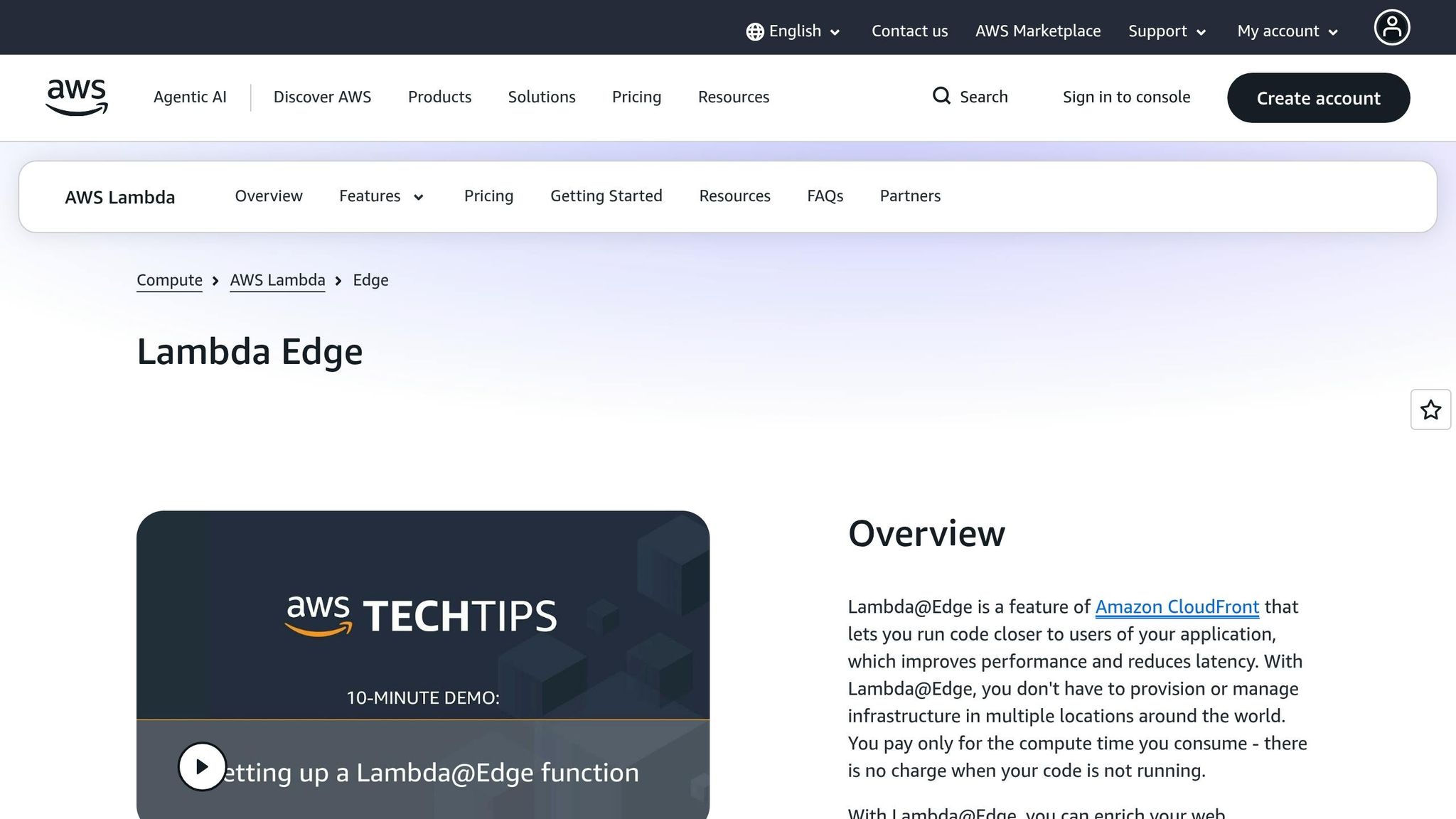
To minimise latency, deploy Lambda@Edge functions at AWS's global edge locations. These functions process requests in real time, reducing delays caused by origin servers. Lambda@Edge operates at four trigger points: Viewer Request, Origin Request, Origin Response, and Viewer Response. This gives you fine-grained control over how content is delivered. For businesses with global reach, Lambda@Edge can even route API requests to the AWS Region with the lowest latency by using Route 53 latency-based routing.
Some practical applications of Lambda@Edge include URL rewriting, A/B testing, and managing authentication at the edge to block unauthorised traffic before it reaches your backend. For simpler tasks like header manipulation or URL redirects, consider CloudFront Functions. These are designed for lightweight tasks, executing in under 1ms, making them a cost-effective choice for high-scale operations. Reserve Lambda@Edge for more complex needs, such as tasks requiring network access or significant content changes, where execution times can extend up to 5 seconds for viewer triggers or 30 seconds for origin triggers.
Monitoring and Improving CloudFront Performance
Tracking Metrics with Amazon CloudWatch
Once your CloudFront distribution is set up, keeping an eye on its performance is crucial. The good news? CloudFront automatically sends operational metrics to Amazon CloudWatch at no extra cost. These metrics cover essentials like request counts, bytes downloaded, and 4xx/5xx error rates, giving you a snapshot of your distribution's health. Since all CloudFront metrics are globally aggregated and sent to the US East (N. Virginia) Region (us-east-1), be sure to select this region when setting up alarms or dashboards.
For deeper insights, you can enable additional metrics to monitor Cache Hit Rate and Origin Latency. While this comes with a fee per distribution, it helps pinpoint whether delays are caused by CloudFront itself or your backend server. For example, you can set up CloudWatch alarms for the 5xxErrorRate metric to get notified if errors exceed a set threshold - say, 5% over five consecutive minutes. You can also use metric math to calculate custom indicators like (Sum of 5xx errors / Total Requests) × 100, which provides a clearer view of your distribution's performance.
If your customer base spans the globe, CloudWatch Internet Monitor can be a game-changer. This tool analyses application traffic and suggests tweaks - like switching AWS Regions or adjusting CloudFront settings - to improve metrics like Time to First Byte (TTFB).
These insights are invaluable for fine-tuning your cache settings to reduce latency and minimise backend load.
Adjusting Cache Settings for Better Performance
With the metrics from CloudWatch in hand, you can refine your cache settings to boost performance. Start by improving your cache hit ratio: reduce "cache key" dimensions by forwarding only the headers, cookies, or query strings that are absolutely necessary. Simplify request parameters so that variations - like "parameter1=A¶meter2=B" versus "parameter2=B¶meter1=A" - generate the same cache key.
For static files, consider using file versioning. This ensures immediate updates while allowing for aggressive cache durations. Plus, you can take advantage of the 1,000 free monthly invalidations offered by CloudFront. For dynamic content, leverage Cache-Control headers with s-maxage to strike a balance between freshness and backend load. For instance, Cache-Control: max-age=0, s-maxage=600 keeps content cached at the edge for 10 minutes while forcing browsers to revalidate.
"A proper CloudFront caching strategy is not optional - it determines whether your system scales smoothly or struggles under load." - Haposoft
Cost and Performance Benefits of AWS CloudFront for SMBs
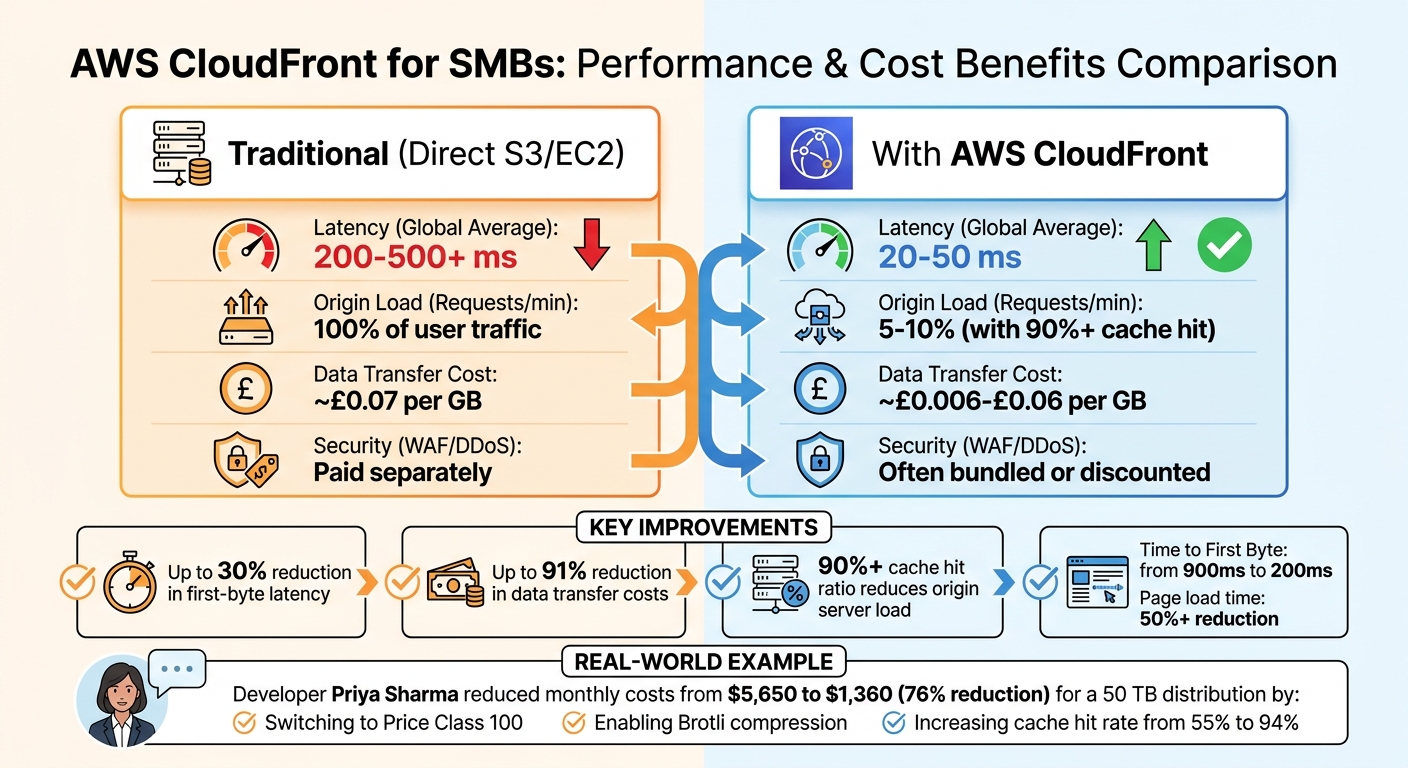
AWS CloudFront Performance and Cost Comparison: Before vs After Implementation
Comparing Metrics Before and After CloudFront
AWS CloudFront dramatically reduces both latency and data transfer costs for small and medium-sized businesses (SMBs). Before using CloudFront, content is often delivered directly from S3 or EC2, meaning every user request travels to the origin server. Once CloudFront is implemented, requests are served from edge locations closer to the user, cutting global latency from 200–500 ms to just 20–50 ms.
The cost savings are equally impressive. Direct S3 egress charges average around £0.07 per GB, while CloudFront rates range between £0.006 and £0.06 per GB. This translates to as much as a 91% reduction in data transfer costs. Additionally, with a cache hit ratio exceeding 90%, only 5%–10% of requests reach the origin server. This allows businesses to scale down EC2 instances, significantly reducing compute costs.
| Metric | Traditional (Direct S3/EC2) | With AWS CloudFront |
|---|---|---|
| Latency (Global Average) | 200 ms – 500 ms+ | 20 ms – 50 ms |
| Origin Load (Requests/min) | 100% of user traffic | 5%–10% (with 90%+ cache hit) |
| Data Transfer Cost (£/GB) | ~£0.07 | ~£0.006–£0.06 |
| Security (WAF/DDoS) | Paid separately | Often bundled or discounted |
A practical example of these savings comes from developer Priya Sharma. In April 2026, she reduced the monthly bill for a 50 TB distribution from $5,650 to $1,360. This 76% cost reduction was achieved by switching to Price Class 100, enabling Brotli compression, and increasing the cache hit rate from 55% to 94%.
These improvements in cost and performance provide a strong foundation for further optimisation.
Balancing Cost and Performance
To maximise the benefits of CloudFront, SMBs can adopt additional strategies to strike the right balance between cost and performance. The AWS free tier is a great starting point. It includes 1 TB of data transfer out and 10 million HTTP/HTTPS requests per month at no cost, which is sufficient for many small business websites. For businesses with a primary audience in the US, Canada, and Europe, switching to Price Class 100 can cut data transfer costs by 30%–50% by avoiding higher-cost edge locations.
Compression is another effective way to lower costs. Enabling Gzip or Brotli compression can reduce data transfer volumes by 60%–80% for text-based content, which directly impacts per-GB billing.
"CloudFront is dramatically cheaper than serving traffic directly from EC2 or S3. But 'cheap' does not mean 'free', and CloudFront bills accumulate through several mechanisms that are easy to optimise." – Priya Sharma, Full-Stack Developer
For detailed advice on cost-effective AWS services, check out AWS Optimization Tips, Costs & Best Practices for Small and Medium sized businesses.
Conclusion: Using AWS CloudFront to Support SMB Growth
AWS CloudFront helps small and medium-sized businesses (SMBs) compete on a global scale without the need for expensive infrastructure. With 750+ Points of Presence around the world, it ensures fast and reliable service delivery. For example, it can reduce Time to First Byte from 900 ms to just 200 ms and cut full page load times by over 50%. These improvements directly enhance customer satisfaction and drive higher conversion rates.
It’s also a cost-effective solution. With an always-free tier and flat-rate plans, CloudFront helps businesses manage cloud expenses while sticking to predictable budgets. Flat-rate plans, starting at approximately £12 per month, come with built-in security features like AWS WAF and DDoS protection. Additionally, businesses don’t face extra charges for data transfers between AWS origins and CloudFront edge locations, making it easier to scale without escalating costs.
CloudFront simplifies operations as well. By shifting traffic to edge locations, SMBs can rely on smaller, more affordable EC2 instances without sacrificing performance. Features like automatic Brotli compression and Origin Shield enhance efficiency and require minimal setup, offering significant benefits with little effort. These advantages make CloudFront a smart choice for SMBs aiming for long-term growth.
"You don't need a complex backend to go global... What you need is a clear understanding of where your performance is breaking - and a simple tool to fix it." – Rowsan Ali, Developer
The combination of improved performance, cost savings, and operational simplicity makes CloudFront a powerful tool for SMBs. By leveraging the configuration and monitoring strategies previously discussed, businesses can use CloudFront not only as a performance enhancer but as a driver of sustainable growth. For additional tips on optimising AWS infrastructure, including cost management and performance tuning, visit AWS Optimization Tips, Costs & Best Practices for Small and Medium sized businesses. CloudFront empowers SMBs to grow sustainably while keeping their cloud expenses under control.
FAQs
Do I need CloudFront if my users are only in the UK?
CloudFront isn't just for international users; it can be a game-changer even if your audience is exclusively in the UK. Thanks to its global infrastructure, it streamlines content delivery, ensuring faster load times and a smoother user experience within the UK. Deciding whether to use it will come down to your particular performance goals and what matters most to your business.
How do I choose the right cache settings for static files vs /api routes?
To improve performance, set up CloudFront cache behaviours separately for static files and /api routes:
- Static files: Assign longer TTLs and define path patterns like
/static/*to limit requests to the origin server. Keep forwarded headers and cookies to a minimum. - /api routes: Opt for short TTLs or disable caching altogether. Forward necessary headers and query strings to guarantee up-to-date, dynamic responses.
This approach helps deliver content quickly while maintaining accuracy.
When should I use CloudFront Functions instead of Lambda@Edge?
CloudFront Functions are ideal for handling lightweight, fast tasks. Think of scenarios like normalising cache keys, tweaking headers, managing URL redirects, or authorising requests. Their design focuses on delivering low-latency execution, making them perfect for simple operations that need to be processed quickly.
On the other hand, Lambda@Edge is better suited for more intricate or resource-intensive functions. If your task involves custom resources, external dependencies, or requires access to the request body, Lambda@Edge is the way to go. Its flexibility allows it to handle complex workflows or longer-running processes.
The choice ultimately depends on your specific needs - whether it's simplicity and speed or complexity and customisation.