Serverless Workflow Automation: Best Practices on AWS
Serverless workflows on AWS cut idle costs and simplify automation by combining Step Functions, Lambda and EventBridge for scalable, resilient operations.

Serverless workflows on AWS let you automate tasks without managing servers. Using services like AWS Step Functions, Lambda, and Amazon EventBridge, you can build workflows that scale automatically and charge only for actual usage. This approach is especially useful for small and medium-sized businesses (SMBs) looking to save costs and simplify operations.
Key Takeaways:
- Cost Efficiency: Pay only for execution time, eliminating idle server costs.
- Scalability: Handle high-volume tasks with Express Workflows or long-running processes with Standard Workflows.
- Core Services:
- AWS Step Functions: Orchestrates workflows with branching and error handling.
- AWS Lambda: Executes code for specific tasks.
- Amazon EventBridge: Routes events to trigger workflows.
- Best Practices:
- Choose the right workflow type for cost and performance needs.
- Optimise Lambda functions for speed and lower costs.
- Use EventBridge to filter and route events effectively.
- Monitoring & Security:
- Track performance with CloudWatch and X-Ray.
- Secure workflows with granular IAM permissions and encrypted logs.
Serverless workflows simplify automation, reduce costs, and improve reliability, making them a smart choice for SMBs.
AWS Step Functions Explained 🔥 Build Serverless Workflows Like a Pro
How Serverless Workflow Architecture Works
Serverless architecture shifts the burden of infrastructure management to AWS. Instead of dealing with server provisioning, scaling, or operating system updates, you simply define your workflow, and AWS takes care of execution. This setup works especially well for small to medium-sized businesses, as it reduces overhead and lets developers concentrate on crafting business logic.
The key to this architecture is decoupling. Each element - whether it’s a Lambda function, database operation, or notification - operates independently. Communication between services happens via events instead of direct calls. This design avoids the inefficiencies of the "orchestrator anti-pattern", where a single Lambda function might rack up idle costs. Instead, AWS Step Functions efficiently handle coordination. This principle is crucial for understanding the differences between event-driven and traditional workflows.
Event-Driven vs Traditional Workflows
Traditional workflows rely on synchronous, step-by-step processing. A client sends a request, the server processes it in sequence, and the client waits - sometimes for minutes - until the operation completes. This method not only consumes resources unnecessarily but also creates tight dependencies between components.
Event-driven serverless workflows, on the other hand, work asynchronously. For example, when a customer places an order, the system immediately acknowledges it and triggers separate processes for payment, inventory updates, and shipping notifications. Each task runs independently, so if one process fails, it doesn’t disrupt the entire workflow. This decoupling boosts resilience and allows the system to handle sudden traffic spikes without manual intervention. Now, let’s look at the AWS services that make these workflows possible.
Main AWS Services for Serverless Workflows
AWS provides three main services to build serverless workflows:
- AWS Lambda: Executes your code in response to events, with each invocation lasting up to 15 minutes.
- AWS Step Functions: Acts as the orchestrator, using a visual state machine to coordinate services. It manages branching, retries, and error handling through Amazon States Language.
- Amazon EventBridge: Functions as a serverless event bus, routing events from sources to targets based on your rules.
Additional services play supporting roles. For example, Amazon SQS handles message queuing, Amazon SNS facilitates pub/sub messaging, API Gateway serves as the entry point for applications, and Amazon S3 provides durable storage that can trigger workflows when new objects are added. Step Functions also integrates with over 200 AWS services, reducing the need for custom code and simplifying long-term maintenance.
Best Practices for Building Serverless Workflows
When planning serverless workflows, it's essential to strike a balance between performance, cost, and scalability. Pay attention to how components interact and identify potential bottlenecks early on. Focusing on areas like state machine design, function efficiency, and event routing from the outset can save you from costly reworks later. Below, we'll dive into best practices for designing state machines, optimising Lambda functions, and integrating EventBridge effectively.
Designing State Machines with AWS Step Functions
A well-designed state machine is a cornerstone of serverless architecture. AWS Step Functions provides two workflow types, and selecting the right one can significantly impact both performance and cost.
- Standard Workflows are ideal for long-running processes (up to one year) and ensure exactly-once execution, making them suitable for tasks like payment processing or order fulfilment.
- Express Workflows, on the other hand, are designed for high-volume, short-duration tasks (under five minutes) and operate with at-least-once execution. They're a great fit for idempotent operations like data validation or transformation.
Cost differences are notable: Standard Workflows cost about £18.75 per million state transitions, while Express Workflows are priced at roughly £0.75 per million invocations, with additional charges for duration. For high-throughput tasks, Express Workflows can handle up to 100,000 state transitions per second, compared to 2,000 per second for Standard Workflows.
A useful approach is to nest Express Workflows within Standard Workflows. This allows you to handle high-rate idempotent steps more cost-effectively while using the parent workflow for long-running states or human interactions.
Keep payload size in check, as Step Functions has a 256 KiB limit for data passed between states. For larger datasets, store the data in Amazon S3 and pass the object’s ARN instead. Standard Workflows also have a cap of 25,000 events in execution history. To manage this, consider using the Map state in distributed mode (supporting up to 10,000 parallel child executions) or initiating new executions from a Task state to partition workloads.
Proactive error handling is key. Use Retry and Catch blocks with exponential backoff to handle transient issues like Lambda.ServiceException. Always set TimeoutSeconds for Task states to prevent indefinite hangs, and for long-running tasks with callbacks, use HeartbeatSeconds to detect failures early.
Writing Efficient Lambda Functions
Memory allocation is the main lever for optimising Lambda performance and cost. Since CPU and other resources scale with memory (ranging from 128 MB to 10,240 MB), it's important to test configurations to find the right balance. Tools like AWS Lambda Power Tuning can help identify the optimal setup, while AWS Compute Optimizer provides recommendations once you're in production.
Graviton2 (arm64) processors offer up to 19% better performance at 20% lower cost compared to x86 processors. This is particularly advantageous for tasks like web serving and data processing. Migrating is straightforward for languages like Python and Node.js, though compiled binaries may need adjustments for the ARM architecture.
Design your Lambda functions to be both stateless and idempotent. Statelessness ensures the function isn’t dependent on prior invocations, making scaling and debugging easier. Idempotency, which ensures repeated invocations produce the same outcome, is critical for Express Workflows’ at-least-once execution model. Use idempotency tokens to track completed operations and avoid duplication.
To reduce cold start delays, reuse execution environments by caching data and connections. Lambda retains warm environments briefly after execution, so initialising database connections or API clients outside the handler function can save time. Add time-to-live (TTL) mechanisms to avoid redundant API calls.
Set timeouts slightly above the expected execution duration, but for synchronous invocations, keep them under 29 seconds to avoid unnecessary costs. Optimise logging by setting appropriate retention periods, and consider frameworks like Lambda Powertools to sample debug logs selectively.
Filter events at the source, such as SQS, Kinesis, or DynamoDB Streams, to prevent unnecessary Lambda invocations. For example, if you only need to process orders above £200, configure the filter at the stream level. This avoids triggering your function for irrelevant data and reduces costs.
Using EventBridge for Event-Driven Workflows
EventBridge simplifies service communication by routing events based on rules, eliminating the need for direct, synchronous calls between services. This reduces idle compute costs by preventing functions from waiting unnecessarily. Services publish events to EventBridge, which then routes them to the appropriate targets.
One standout feature of EventBridge is its integration with third-party SaaS providers. Instead of implementing custom polling logic in Lambda - adding complexity and cost - EventBridge can ingest events directly from providers like Salesforce, Zendesk, or Datadog, reducing idle time and related expenses.
Use event filters to ensure only relevant messages trigger Lambda. Filtering irrelevant events at this stage avoids unnecessary invocations and their associated costs.
EventBridge Pipes enhances this functionality by connecting event sources to targets while allowing filtering, enrichment, and transformation. This enables more advanced workflows without requiring extra code for data manipulation.
For synchronous event-driven workflows, keep timeouts under 29 seconds to avoid delays and wasted compute time. For asynchronous workflows, consider pairing EventBridge with SQS to decouple services and allow Lambda to process events in batches, improving efficiency and reducing costs.
Cost Management for Serverless Workflows
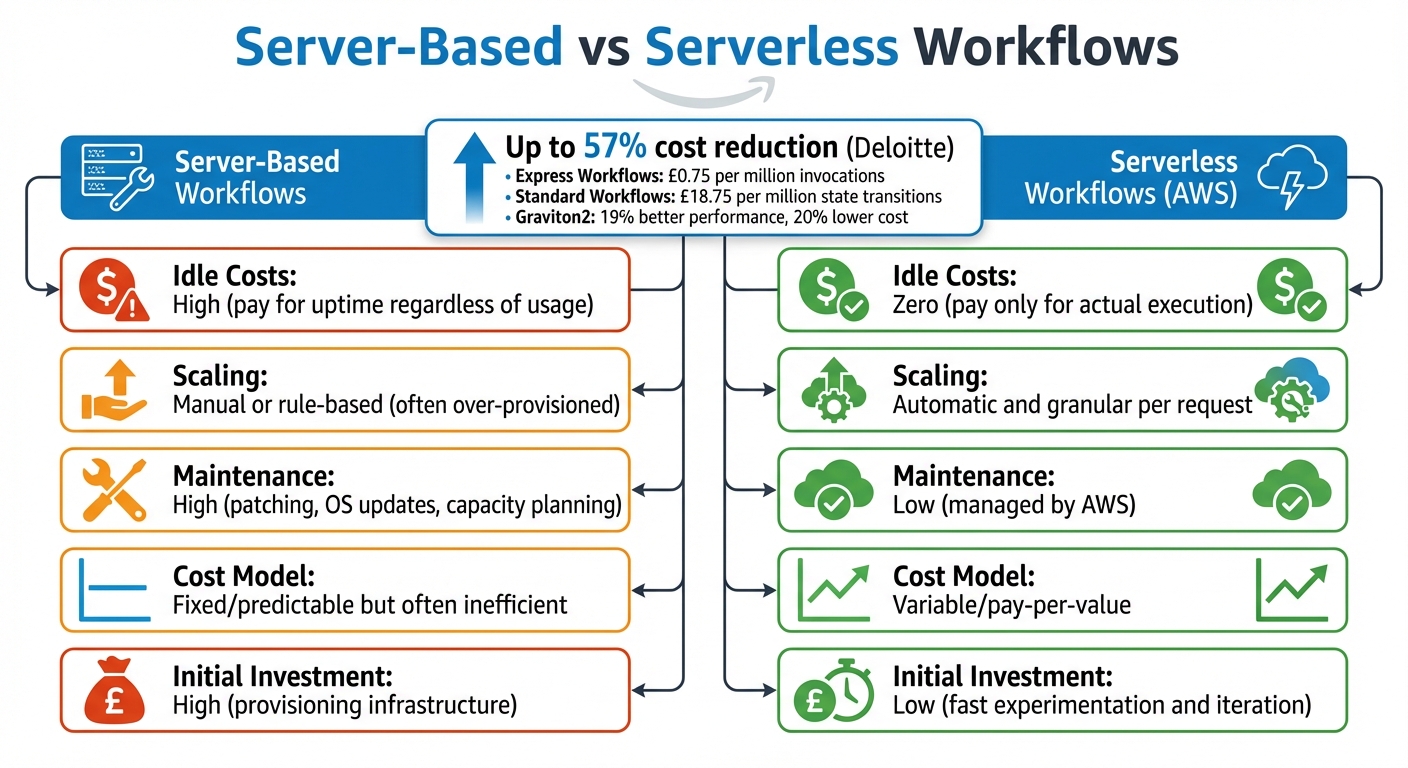
Serverless vs Server-Based Workflows: Cost and Performance Comparison
After fine-tuning workflow design and improving efficiency, keeping costs in check becomes a priority for SMBs. Serverless architecture offers a game-changing advantage: you only pay for what you use. Unlike traditional server-based systems - where you're charged for uptime whether your application is working or idle - serverless workflows charge solely for execution time and resources consumed. According to Deloitte, serverless applications can reduce costs by up to 57% compared to server-based solutions. For SMBs operating with tight budgets, this shift from paying for capacity to paying for actual value can make a huge difference. This cost-conscious approach aligns perfectly with earlier discussions on optimising performance and efficiency.
Removing Idle Costs
One of the standout benefits of serverless workflows is the elimination of idle costs. Pay-per-use charges apply only when tasks are actively being processed. For example, AWS Lambda functions run exclusively when triggered, and Step Functions charge based on state transitions or invocations rather than continuous runtime. This model is especially useful for workflows with fluctuating traffic, which is common in SMBs experiencing growth or seasonal demand spikes. During idle times, costs drop to nearly zero, whereas traditional server setups would still incur charges for provisioned capacity. Automatic scaling further reduces waste, as you no longer need to over-provision resources to handle peak loads.
Reducing Lambda Invocations
Another way to keep costs under control is by cutting unnecessary Lambda invocations. Direct integrations and event filtering with services like DynamoDB, SQS, SNS, and S3 can help eliminate redundant 'glue code' and reduce invocation frequency. AWS Step Functions, for instance, supports direct integrations with over 200 AWS services. Instead of using a Lambda function to retrieve data from DynamoDB and pass it to the next step, you can configure your state machine to interact with DynamoDB directly. Similarly, Lambda supports event filtering for sources like SQS, Kinesis, and DynamoDB Streams, ensuring functions are triggered only when specific criteria are met.
Choosing the right workflow type also plays a role in cost management. For example, Express Workflows cost roughly £0.75 per million invocations, plus duration charges, while Standard Workflows are priced at about £18.75 per million state transitions. For tasks that are high-volume but brief - like data validation or transformation under five minutes - Express Workflows offer a more economical choice. Additionally, switching to Graviton2 (Arm64) processors can boost performance by up to 19% while cutting costs by 20% compared to x86-based options. This is an easy win for compatible workloads.
Cost Comparison: Serverless vs Server-Based Workflows
| Server-Based Workflows | Serverless Workflows (AWS) |
|---|---|
| Idle Costs: High (pay for uptime regardless of usage) | Idle Costs: Zero (pay only for actual execution) |
| Scaling: Manual or rule-based (often over-provisioned) | Scaling: Automatic and granular per request |
| Maintenance: High (patching, OS updates, capacity planning) | Maintenance: Low (managed by AWS) |
| Cost Model: Fixed/predictable but often inefficient | Cost Model: Variable/pay-per-value |
| Initial Investment: High (provisioning infrastructure) | Initial Investment: Low (fast experimentation and iteration) |
If you're looking for more tailored advice on managing AWS costs and architecture, AWS Optimization Tips, Costs & Best Practices for Small and Medium sized businesses provides expert guidance designed for organisations on a budget.
Monitoring and Security for Serverless Workflows
After focusing on performance and cost, it’s essential to ensure your workflows are both well-monitored and secure. For UK SMBs, this is particularly important to maintain GDPR compliance. Serverless architectures, with their distributed nature, can make tracking performance and securing data flows more challenging than traditional setups. Thankfully, AWS offers built-in tools to simplify operational visibility and compliance.
Monitoring with CloudWatch and X-Ray
Once workflows are optimised, monitoring becomes a priority. AWS CloudWatch and X-Ray provide a comprehensive view of serverless workflows. CloudWatch tracks key metrics like Duration, Invocations, Errors, and Throttles for Lambda, as well as ExecutionsStarted, ExecutionsAborted, and StateTransitions for Step Functions. By setting alarms in CloudWatch, you can catch issues early, such as error rates exceeding 1% or durations going beyond the p95 threshold.
To activate monitoring, enable X-Ray tracing for Lambda in the AWS Console or through your SAM template. For Step Functions, include X-Ray in the state machine definition using the configuration:
"LoggingConfiguration": {"Level": "ALL", "IncludeExecutionData": true}
This also integrates with CloudWatch Logs. X-Ray offers end-to-end tracing across components, helping you visualise latencies and errors. This is particularly useful for pinpointing bottlenecks like cold starts or slow service responses. Step Functions, with their capacity for up to 4,000 state transitions per second in Standard workflows, include visual dashboards that provide real-time diagnostics and execution histories (up to 25,000 items per workflow).
Setting Up IAM Permissions
Securing workflows while adhering to GDPR starts with carefully managed IAM roles and policies. For Lambda, assign execution roles with policies such as AWSLambdaBasicExecutionRole and add custom policies that limit actions - for instance, only allowing s3:GetObject on specific buckets. Avoid wildcard permissions like *:*, which can expose your workflows unnecessarily.
When working with Step Functions and EventBridge, create an IAM role called StatesExecutionRole via the AWS Console. Attach an inline policy like this:
{
  "Statement": [
    {
      "Effect": "Allow",
      "Action": ["lambda:InvokeFunction", "events:PutEvents"],
      "Resource": [
        "arn:aws:lambda:region:account:function:myFunc",
        "arn:aws:events:region:account:event-bus/default"
      ]
    }
  ]
}
This approach restricts permissions to specific resources, reducing risks in multi-tenant environments. Use AWS Assume Role for temporary credentials instead of long-term keys, enhancing security by limiting credential lifespan. To maintain audit trails - crucial for GDPR compliance - enable AWS CloudTrail alongside IAM. You can export these logs to S3 with KMS encryption, ensuring data residency within the London region.
Error Handling and Resilience
Beyond securing access, it’s critical to build resilience through effective error handling. Use exponential backoff retries and configure timeout and heartbeat policies to avoid hanging tasks and wasted resources. For example, in Amazon States Language, you might use:
"Retry": [
  {
    "ErrorEquals": ["Lambda.ServiceException"],
    "IntervalSeconds": 2,
    "MaxAttempts": 3,
    "BackoffRate": 2.0
  }
]
For long-running tasks, Step Functions Standard workflows allow executions lasting up to a year. Use HeartbeatSeconds to detect and handle stuck processes.
Combine retry logic with AWS's multi-AZ fault tolerance to ensure high availability. Monitor failure rates with CloudWatch and trigger alerts if they exceed 5%. SMBs can further validate resilience by running layered and automated tests to simulate intermittent failures. This ensures workflows remain reliable without adding significant operational overhead - a must for resource-conscious teams.
Conclusion
Serverless workflow automation on AWS offers UK small and medium-sized businesses (SMBs) the ability to build scalable systems without the hassle of managing physical infrastructure. By using AWS Step Functions for orchestration and Lambda for execution, businesses can automate tasks like customer onboarding and data processing while benefiting from a pay-as-you-go pricing model.
One major advantage of serverless is the elimination of idle server costs. Step Functions charge per 1,000 state transitions, and Lambda only bills for execution time. For SMBs with fluctuating workloads, this model can lead to substantial savings compared to maintaining always-on EC2 instances. For example, one SMB saw debugging time drop from hours to minutes after migrating to a Step Functions-based setup, showcasing how cost efficiency aligns with operational simplicity.
AWS also provides robust built-in security and monitoring tools. Features like granular IAM permissions, real-time metrics with CloudWatch, and end-to-end tracing with AWS X-Ray ensure secure and transparent operations. For UK businesses navigating GDPR compliance, these tools offer essential audit trails and support data residency requirements, eliminating the need for custom solutions.
Operational efficiency gets another boost with visual dashboards that pinpoint failures immediately, slashing debugging time. Recent AWS SDK integrations also allow direct API calls to services like Rekognition, reducing the need for intermediate Lambda functions. This streamlined approach not only reduces code complexity but also minimises error rates, freeing small teams to focus on their core objectives rather than infrastructure management.
To learn more about AWS automation and cost-saving strategies, check out AWS Optimization Tips, Costs & Best Practices for Small and Medium sized businesses. By leveraging state machines, efficient Lambda functions, and event-driven workflows, SMBs can confidently scale with AWS - building systems that adapt automatically, manage failures effectively, and deliver measurable outcomes without the burden of traditional server upkeep.
FAQs
When should I use Standard vs Express Step Functions?
Standard Step Functions are perfect for workflows that need to run for a long time - up to one year. They’re durable and provide detailed auditing, making them a reliable choice for processes that require monitoring and traceability over extended periods.
On the other hand, Express Step Functions are designed for tasks that are short and fast-paced, typically lasting up to 5 minutes. They’re ideal for handling high-volume operations like IoT data ingestion or real-time streaming data processing.
When deciding, focus on the workflow’s duration and volume requirements to determine the best fit for your needs.
How can I make Lambda idempotent for at-least-once workflows?
To make sure your Lambda functions handle at-least-once workflows without causing repeated actions, you need to build idempotency into your code. The key here is using an idempotency key - something like a unique request ID - to identify and track each request.
Here's how it works: store the idempotency key along with the result of the processed request in a persistent storage solution, such as DynamoDB. When a new request comes in, check the storage to see if the key already exists. If it does, simply return the previously stored result instead of reprocessing the request. This approach helps avoid duplicate actions or unintended side effects, especially during retries or when duplicate events occur.
What’s the simplest way to monitor and trace a workflow end-to-end?
To keep an eye on and trace an end-to-end workflow on AWS, the easiest approach is combining CloudWatch for metrics and logs with AWS X-Ray for distributed tracing. These tools work hand-in-hand to give you visibility into your system, making it easier to monitor performance and resolve any issues efficiently.