Scaling AWS Lambda for High Traffic
Use provisioned/reserved concurrency, auto‑scaling, multi‑region deployment and monitoring to reduce throttling, cold starts and downstream strain.
AWS Lambda scales automatically, but high traffic can introduce challenges like throttling, cold starts, and downstream service strain. Here's how you can manage these issues effectively:
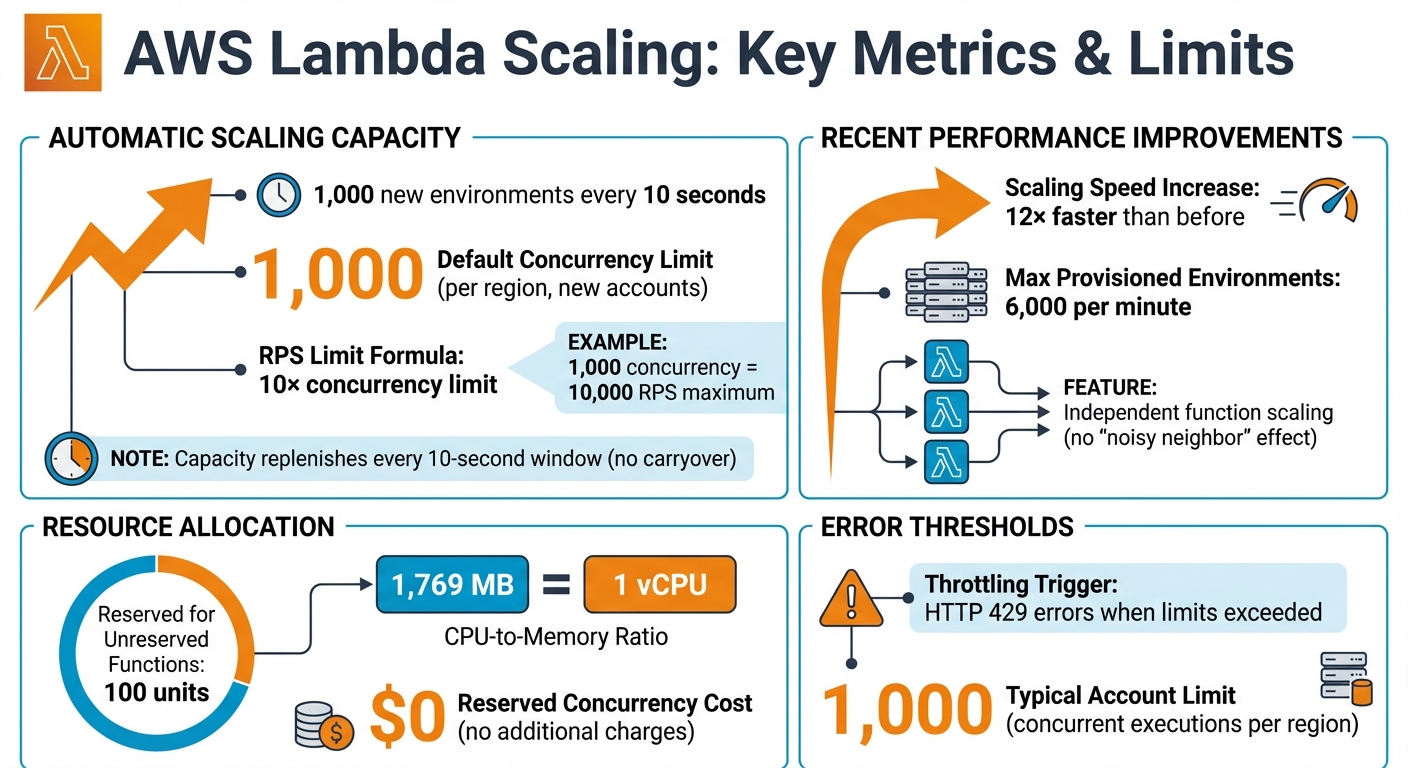
- Concurrency Limits: AWS Lambda scales by 1,000 new environments every 10 seconds, with a default concurrency cap of 1,000 per region for new accounts. Exceeding this limit causes HTTP 429 errors.
- Cold Starts: Functions face delays when new environments are created during sudden traffic spikes.
- Downstream Bottlenecks: Services like databases can become overwhelmed without proper safeguards.
- Cost Management: Inefficient functions can lead to unexpected charges.
Key Solutions:
- Provisioned Concurrency: Keeps environments pre-initialised to reduce latency during traffic spikes.
- Auto-Scaling: Dynamically adjusts provisioned concurrency using demand metrics.
- Scheduled Scaling: Prepares for predictable traffic surges, like peak hours.
- Multi-Region Deployment: Distributes traffic across regions to increase capacity while protecting shared resources.
- Reserved Concurrency: Prevents critical functions from being throttled and safeguards downstream services.
Monitoring metrics like ConcurrentExecutions, ProvisionedConcurrencyUtilisation, and AsyncEventAge in CloudWatch ensures smooth scaling and cost efficiency.
Understanding AWS Lambda scaling and throughput
How AWS Lambda Scaling Works
AWS Lambda Scaling Limits and Performance Metrics
Automatic Scaling Behaviour
AWS Lambda manages scaling automatically by creating a new execution environment for each incoming request. These environments are kept warm for future calls, ensuring quicker responses. In ideal conditions, a function can ramp up its concurrent executions by 1,000 every 10 seconds. However, if requests exceed this rate, they result in an HTTP 429 error.
AWS also imposes a requests-per-second (RPS) limit, which is set at 10 times your account's concurrency limit. For example, with the default concurrency limit of 1,000, your account can handle up to 10,000 RPS. The scaling capacity of 1,000 units is replenished every 10-second window, but any unused capacity does not carry over to the next window.
Recent updates have further refined this scaling mechanism, improving both speed and efficiency.
Recent Scaling Updates
AWS has introduced updates that significantly enhance Lambda's scaling performance. These changes allow functions to scale up to 12 times faster than before. Additionally, functions now scale independently, ensuring that one function's resource usage does not interfere with others - a concept often referred to as eliminating the "noisy neighbour" effect.
As Marcia Villalba explains:
"Each synchronously invoked Lambda function now scales by 1,000 concurrent executions every 10 seconds until the aggregate concurrency across all functions reaches the account's concurrency limit."
These improvements are applied automatically to all synchronously invoked functions in commercial AWS regions, with no extra cost to users.
Concurrency Limits and Resource Allocation
To effectively manage Lambda's automatic scaling, it's important to understand concurrency limits. Concurrency refers to the number of active requests being processed at any given moment. For new accounts, this is typically capped at 1,000 concurrent executions per region. AWS reserves 100 units for unreserved functions, so assigning reserved concurrency to critical functions ensures they are protected from throttling. Notably, reserved concurrency does not come with additional charges.
Lambda also ties CPU power to the memory configuration of a function. For instance, allocating 1,769 MB of memory provides the equivalent of one vCPU. By optimising execution time, you can reduce the concurrency required to handle specific traffic volumes.
Common Scaling Problems
Throttling and HTTP 429 Errors
Throttling happens when AWS Lambda can't keep up with the volume of incoming requests, resulting in HTTP 429 errors. These errors occur because the service rejects requests it can't handle. The primary culprit is often hitting the account's default concurrency limit. Once this limit is exceeded, throttling kicks in across all functions within the same region.
Reserved concurrency at the function level can also lead to throttling. For instance, if you cap a function's concurrency at 500, it will start throttling once that limit is reached - even if there’s unused capacity elsewhere in your account. Another factor to consider is Lambda’s requests-per-second (RPS) quota, which is set at 10 times your concurrency limit. For functions with execution times under 100 ms, this RPS quota might be exhausted before hitting the concurrency ceiling.
Service mismatches can make the problem worse. Take Amazon API Gateway, for example. It has a default limit of 10,000 RPS, which can easily overwhelm a Lambda function operating with just 1,000 concurrent executions. For synchronous calls, throttling results in immediate rejections. On the other hand, asynchronous calls trigger automatic retries by Lambda, potentially delaying processing further.
Cold Starts and Latency Issues
Cold starts occur during the "Init" phase when Lambda needs to create a fresh execution environment before handling a request. This process introduces delays, which become especially noticeable during traffic surges when no pre-initialised environments are available. While the environment is being set up, it remains busy and cannot process other requests until both the initialisation and the first invocation are complete.
For applications where low latency is critical - like web APIs or mobile backends - cold starts can lead to timeouts or slower performance. Traffic spikes can make this worse, as multiple environments may need to initialise at the same time. This can result in a ripple effect of delays across your application, further compounding the throttling issues mentioned earlier.
High-Traffic Scenarios
High-traffic events bring their own set of challenges. For example, during an e-commerce flash sale, traffic might jump from a few hundred to tens of thousands of requests per second. If your account is limited to the default 1,000 concurrent executions and your functions aren’t optimised, you could face a combination of throttling and cold start delays.
Breaking news events can create similar traffic surges. Lambda functions responsible for tasks like handling API requests, processing images, or delivering content may struggle to keep up. Large-scale data operations, such as those initiated by Amazon Athena or Redshift user-defined functions, can also trigger thousands of Lambda invocations within seconds, adding to the strain.
How to Optimise AWS Lambda for High Traffic
When dealing with high traffic, challenges like throttling, cold starts, and sudden bursts of activity can create bottlenecks. However, with the right optimisation strategies, AWS Lambda can handle these scenarios effectively.
Using Provisioned Concurrency
Provisioned concurrency helps tackle cold starts by keeping execution environments pre-initialised, ensuring they’re ready to handle requests immediately. Unlike the on-demand model, which spins up environments as requests come in, provisioned concurrency ensures low-latency responses - even during traffic spikes - making it ideal for workloads like web APIs or mobile backends.
To use this feature, configure provisioned concurrency on a specific function version or alias (but not the $LATEST version). For the best results, move heavy initialisation tasks, such as loading libraries or setting up SDK clients, outside the main handler. This ensures these tasks are completed during environment allocation rather than during each request. For .NET 8, you can enable ahead-of-time JIT compilation by setting AWS_LAMBDA_DOTNET_PREJIT=ProvisionedConcurrency.
To estimate the required concurrency, use this formula:
Concurrency = (average requests per second) × (average request duration in seconds).
Adding a 10% buffer to your peak estimate can help manage minor fluctuations. If requests exceed your provisioned limit, Lambda will switch to on-demand concurrency, which may introduce cold start delays. Monitoring the ProvisionedConcurrencySpilloverInvocations metric in CloudWatch can help you identify whether your provisioned capacity is adequate.
Keep in mind that provisioned concurrency comes with additional costs. You’ll be charged for the number of environments allocated and the time they remain active, even if they’re idle. However, Lambda can scale up to 6,000 environments per minute, offering significant flexibility.
Auto-Scaling with Application Auto Scaling
Application Auto Scaling integrates with Lambda to adjust provisioned concurrency dynamically based on demand. It uses the LambdaProvisionedConcurrencyUtilization metric to monitor capacity usage. Target tracking policies typically aim for around 70% utilisation, balancing performance with cost efficiency. The service scales up quickly to meet demand but reduces capacity more gradually to avoid instability.
Before enabling auto-scaling, set an initial provisioned concurrency value. For functions with very short execution times (20–100 ms), consider using the Maximum statistic in CloudWatch alarms to trigger scaling faster during sudden traffic surges. Standard alarms usually wait for three consecutive data points (about three minutes of sustained load) before initiating scaling actions.
Watch for INSUFFICIENT_DATA states in CloudWatch, as Lambda only emits utilisation metrics when a function is active. This can prevent auto-scaling from scaling down during inactive periods, potentially leading to unnecessary costs. Also, remember the default account-level concurrency limit: 1,000 concurrent executions per region, with a requests-per-second limit of 10 times that concurrency. Reserve 100 concurrency units for functions without reserved settings to avoid throttling.
Scheduled Scaling for Predictable Traffic
For workloads with consistent traffic patterns, scheduled scaling can be a cost-effective alternative to continuous auto-scaling. For example, if you expect a spike at 09:00 or during a lunchtime rush, you can schedule an increase in provisioned concurrency 15–30 minutes beforehand. This ensures environments are ready when the traffic hits. Once the peak subsides, you can scale back down to save on costs.
Track metrics like Invocations (requests per second) and Duration (average execution time) to calculate the required concurrency using the earlier formula. Additionally, monitor ProvisionedConcurrencyUtilisation to identify over-provisioning. If utilisation is consistently low, you may be paying for capacity you don’t need. Apply scheduled scaling to specific function aliases (e.g., PROD) rather than the $LATEST version for more predictable performance.
To further optimise costs, consider using AWS Compute Optimiser’s memory size recommendations and ARM/Graviton processors, which often deliver better price-to-performance ratios.
For additional tips on balancing performance and costs, especially for small and medium-sized businesses, check out AWS Optimization Tips, Costs & Best Practices for Small and Medium Sized Businesses.
Advanced Scaling Methods
Building on earlier strategies for automatic and provisioned scaling, these advanced techniques help fine-tune scalability while safeguarding critical services.
Multi-Region Traffic Distribution
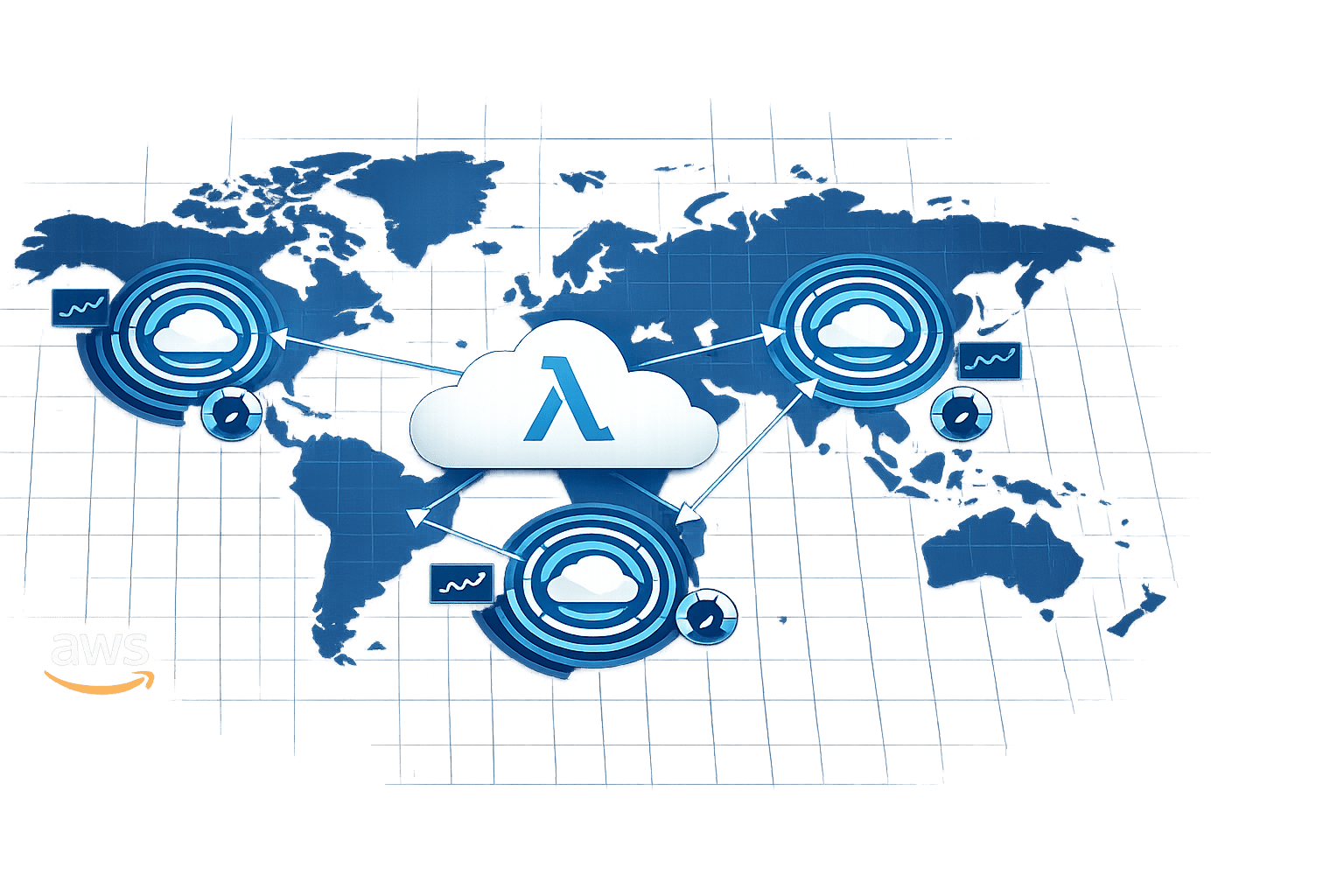
Deploying your services across multiple regions significantly boosts overall capacity. Each region operates independently, scaling up to 1,000 execution environment instances every 10 seconds. By using Route 53 with latency-based or weighted routing, user traffic is directed to the nearest region. If one region experiences a failure, traffic is automatically redirected to another, ensuring continued availability.
While distributing traffic across regions increases compute capacity, it’s essential to protect shared downstream resources. For instance, if you rely on a central database that isn’t replicated across regions, you should set reserved concurrency limits for each regional function. This prevents overwhelming the shared database during high-traffic periods. Pairing this multi-region setup with dynamic concurrency settings allows for optimal performance without risking resource strain.
Combining Burst and Provisioned Concurrency
Balancing burst capacity with provisioned concurrency is another way to handle fluctuating workloads effectively. Provisioned concurrency ensures there are no cold starts for baseline traffic, while Lambda’s burst capacity absorbs sudden spikes in demand.
A practical approach is to set reserved concurrency slightly higher than provisioned concurrency. This creates a dedicated capacity buffer, ensuring your function can scale without competing for the account’s unreserved concurrency pool. To optimise, maintain enough provisioned environments to handle steady traffic and rely on burst capacity for unexpected surges. This balance ensures smooth performance under varying loads.
Protecting Downstream Services
These advanced strategies not only optimise compute resources but also safeguard dependent services. Reserved concurrency limits are crucial here - they prevent downstream services from being overwhelmed. For example, if your database can handle only 10 concurrent connections, setting your function’s reserved concurrency to 10 ensures Lambda won’t exceed that limit.
For asynchronous invocations, Lambda queues incoming events, decoupling requests from execution. It manages retries to prevent sudden traffic spikes from overloading downstream systems. In critical scenarios, setting reserved concurrency to zero acts as an emergency off-switch, halting all invocations during maintenance or when dependent services are struggling.
To further prevent data loss during outages, configure a dead-letter queue (DLQ) using SNS or SQS. This captures events that fail after all retry attempts. Monitoring the AsyncEventAge metric helps you identify potential issues - an increase in this metric often indicates throttling or delays in downstream services. These measures ensure reliability and resilience even under challenging conditions.
Conclusion
Scaling AWS Lambda to handle high traffic involves finding the right balance between performance, cost, and reliability. The strategies outlined here provide a solid foundation for managing traffic spikes while protecting downstream services. By combining automatic scaling with reserved concurrency limits, businesses can keep their applications responsive under pressure. At the same time, keeping an eye on cost efficiency is just as crucial.
Cost management plays a big role in maintaining performance. Techniques like event filtering and asynchronous processing patterns help reduce billed invocations, making the most of Lambda's pay-per-use model. As Deloitte Research highlights:
"Serverless applications can offer up to 57% cost savings compared with server‐based solutions".
For small and medium-sized businesses (SMBs) facing these challenges, resources such as AWS Optimization Tips, Costs & Best Practices for Small and Medium Sized Businesses from Critical Cloud provide practical advice on balancing performance and budget, complementing the strategies discussed here.
Monitoring remains a key part of the equation. Tracking metrics like AsyncEventAge and ConcurrentExecutions can help identify and address potential bottlenecks early. With AWS Lambda handling tens of trillions of invocations each month for over 1.5 million active customers, its reliability is well-established, making it a strong choice for scaling SMB applications. By combining these scalable practices with ongoing monitoring, businesses can build a dependable and efficient AWS Lambda environment tailored to their needs.
FAQs
How can I stop AWS Lambda from throttling during periods of high traffic?
Managing concurrency is key to preventing AWS Lambda from throttling during periods of high traffic. Start by keeping a close eye on your usage and confirming that your account’s concurrency limits can handle your workload. If they fall short, you can always request an increase from AWS.
To take it a step further, you might want to use reserved concurrency to set aside capacity for critical functions, ensuring they always have the resources they need. Another option is provisioned concurrency, which pre-warms your functions so they’re ready to handle sudden bursts of traffic without delays. Don’t forget to implement rate limiting as well - this helps prevent your downstream systems from getting overwhelmed and keeps everything running smoothly.
By staying on top of these strategies, you can make sure your application scales effectively and avoids disruptions, even during peak demand.
How can I reduce the impact of cold starts on AWS Lambda performance?
To reduce the effect of cold starts on AWS Lambda performance, you can take advantage of provisioned concurrency. This feature ensures that your functions stay warm and ready to execute when needed. Another effective approach is preloading dependencies and setting up resources during deployment, which can help cut down startup times.
You can also improve performance by optimising your code and runtime. For instance, trimming down package sizes and removing unnecessary libraries can make a noticeable difference. Additionally, Lambda SnapStart offers a way to cache initialisation snapshots, speeding up execution significantly.
By using these methods, you can keep your applications responsive during peak traffic while carefully managing costs.
How can deploying AWS Lambda across multiple regions improve scalability?
Deploying AWS Lambda across multiple regions enables your functions to operate simultaneously in different parts of the world. This setup helps reduce latency by directing user requests to the nearest region, ensuring a faster response time. It also strengthens fault tolerance, keeping your services available even if one region faces downtime.
To maximise efficiency, you can leverage regional API endpoints and set up Route 53 routing in an active-active configuration. This method enhances the user experience while handling high traffic volumes with ease.