CI/CD Automation with AWS: Best Practices
Secure, cost-efficient AWS CI/CD: use CodePipeline, CodeBuild and CodeDeploy. Start small, automate tests, monitor pipelines, enable blue/green or canary rollbacks.
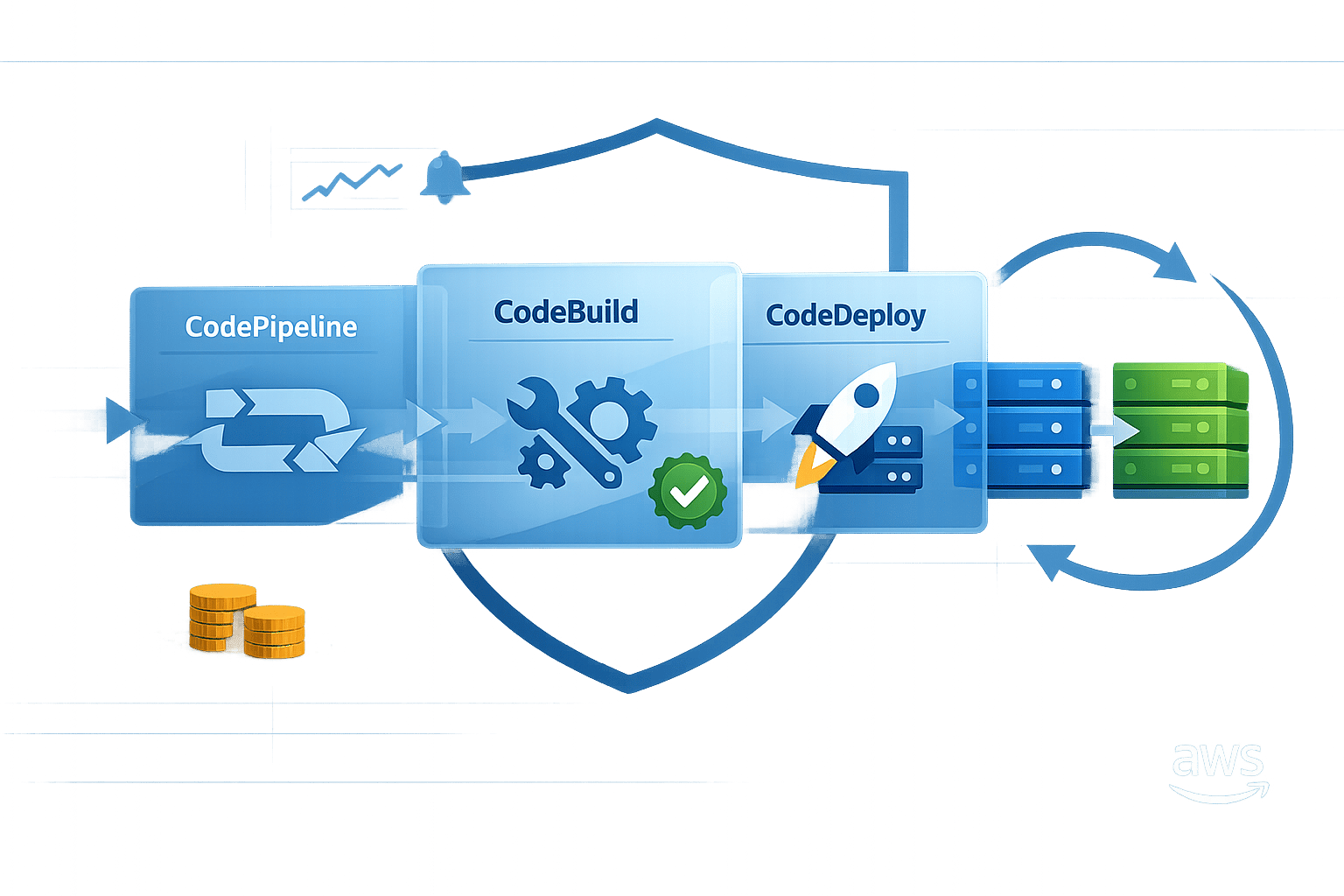
Building reliable CI/CD pipelines with AWS can save time, reduce errors, and improve software delivery. Here's what you need to know:
- CI/CD Basics: Continuous Integration (CI) merges code changes frequently with automated testing. Continuous Delivery (CD) prepares code for release, while Continuous Deployment fully automates the release process.
- AWS Tools: AWS CodePipeline automates workflows, CodeBuild handles builds and tests, and CodeDeploy manages deployments across environments like EC2, Lambda, and ECS.
- Best Practices:
- Start with a simple pipeline and expand gradually.
- Use separate AWS accounts for Development, Test, and Production.
- Automate testing (unit tests should make up 70% of your tests).
- Secure artefacts and credentials with AWS Secrets Manager and encryption.
- Monitor pipelines with CloudWatch and use rollback strategies like blue/green or canary deployments.
- Cost and Efficiency: AWS Graviton processors cut build costs by up to 32%. Build caching and optimised instance sizing can save time and resources.
Key takeaway: AWS CI/CD tools simplify development by automating repetitive tasks, improving release speed, and minimising risks. Start small, focus on automation, and prioritise security to create a reliable pipeline.
Build a Production-Ready CI/CD Pipeline on AWS 🚀 | DevOps from Scratch
AWS Services for CI/CD Pipelines
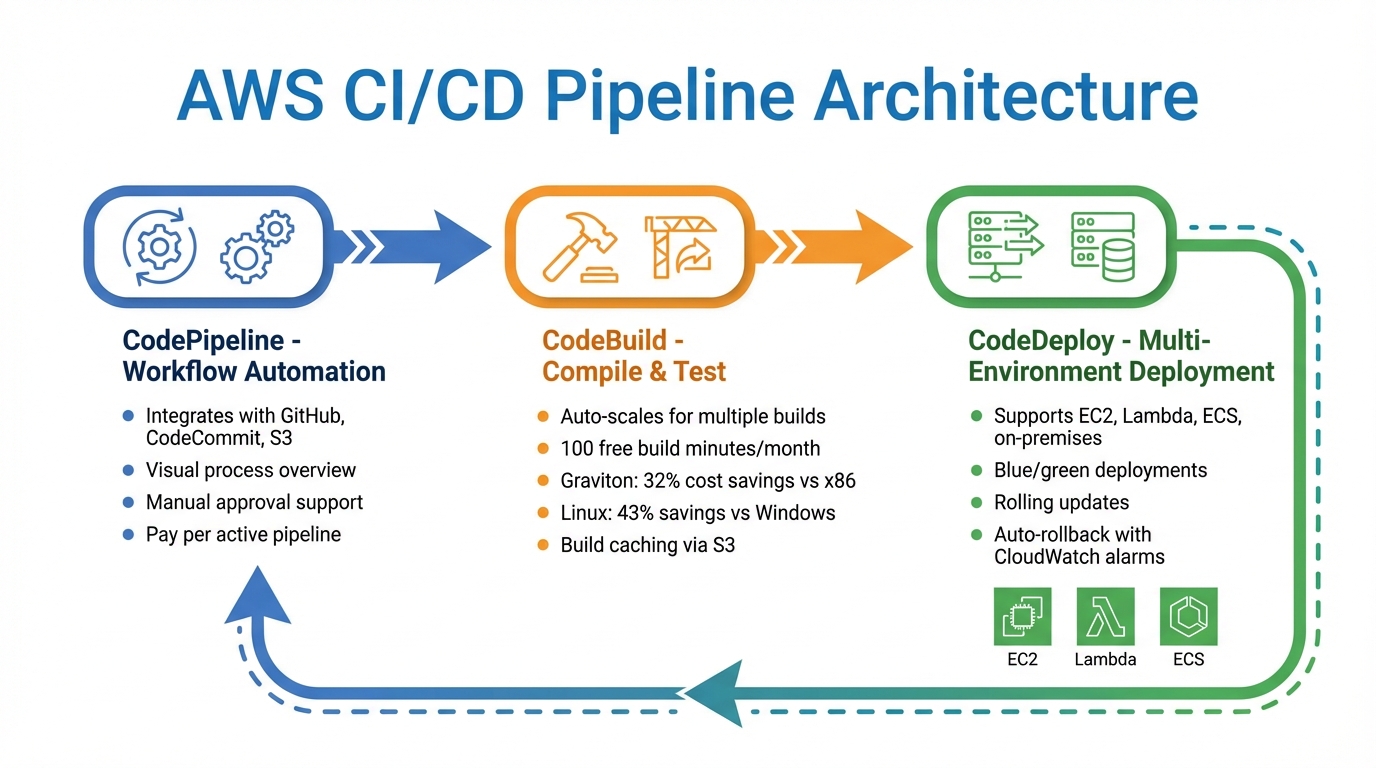
AWS CI/CD Pipeline Architecture: CodePipeline, CodeBuild, and CodeDeploy Workflow
AWS offers three main services designed to streamline the software release process: CodePipeline, CodeBuild, and CodeDeploy. Together, these tools automate everything from code integration to deployment, freeing up teams to concentrate on development instead of infrastructure management. Here's how they work:
AWS CodePipeline
CodePipeline serves as the backbone of your release workflow, automating the movement of code from repositories like GitHub, AWS CodeCommit, or Amazon S3 through build, test, and deployment stages. It provides a clear, visual overview of the entire process, making it easy to spot issues or delays.
This service also integrates seamlessly with third-party tools like Jenkins and supports manual approvals, giving teams the flexibility to pause and review changes before they go live. Pricing is straightforward - you're charged based on the number of active pipelines each month, with no upfront fees.
AWS CodeBuild
CodeBuild takes care of compiling code, running unit tests, and preparing deployment-ready packages - all without needing dedicated build servers. It automatically scales to handle multiple builds at once, ensuring peak demand doesn’t lead to delays.
You get 100 free build minutes each month, and after that, charges are based on the compute time used. For cost savings, switching to ARM-based Graviton processors can cut expenses by 32% compared to x86 instances, while moving from Windows to Linux could save around 43%. To further optimise costs, consider using build caching via Amazon S3 or local storage for large files, and monitor resource usage with CloudWatch to ensure your instances are appropriately sized.
AWS CodeDeploy
CodeDeploy simplifies deployments across various environments, including Amazon EC2, AWS Lambda, Amazon ECS, and even on-premises servers. It supports advanced strategies like blue/green deployments, which create a fresh environment before redirecting traffic, and rolling updates, which replace instances incrementally. These methods help reduce downtime and allow for quick rollbacks if needed.
For added safety, CodeDeploy can automatically revert to the last successful version if a CloudWatch alarm is triggered, reducing the risk of extended outages.
Best Practices for CI/CD Automation on AWS
Pipeline Design
Start with a Minimum Viable Pipeline - something as simple as a basic check or a single unit test. Once this foundation is solid, you can gradually expand it into a full continuous delivery pipeline. To ensure consistency, treat your infrastructure and pipeline configurations as code by using tools like AWS CDK, CloudFormation, or Terraform. This approach makes it easier to replicate environments reliably.
For a more streamlined process, use separate AWS accounts for each environment - Development, Test, and Production. This setup simplifies deployments, improves access control, and helps prevent accidental changes in production. Plus, it makes tracking costs much easier. Pipelines should be structured into clear stages - Source, Build, Staging, and Production - and take advantage of parallel build actions to save time.
AWS CodePipeline offers manual approval actions, which can pause a pipeline for up to seven days before failing automatically if no action is taken. While this feature is a handy safety net, the ultimate aim should be to automate these checks wherever possible.
"A good CI/CD pipeline should make deployments boring - predictable, reliable, and safe".
Once the pipeline is well-designed, the next focus should be on robust testing and security.
Automated Testing and Security
Follow the testing pyramid strategy: around 70% of your tests should be unit tests. These tests are fast, cost-effective, and catch issues early in development. Integration tests and more resource-intensive UI or user acceptance tests should make up the smaller, higher tiers of the pyramid.
Incorporate DevSecOps practices by integrating tools like SAST, secrets detection, and SCA into your build processes, and apply DAST during staging. Tools such as checkov (for scanning Infrastructure as Code templates), hadolint (for validating Dockerfiles), and detect-secrets (to catch hardcoded credentials) are excellent choices for automating security checks.
Make it a priority to shift testing left - closer to the developer's workspace. Detecting issues earlier, even before code is committed, saves time and reduces costs. For example, creating a Makefile that lets developers run CI/CD steps like linting or unit tests locally can speed up feedback loops and lower operational expenses.
"The best way to fix issues in a pipeline is to avoid introducing them into it".
With testing and security in place, managing resources effectively becomes the next step.
Resource Management
Opt for managed services like CodePipeline and CodeBuild to eliminate the need for provisioning and maintaining build servers. This approach is especially beneficial for small and medium-sized businesses working with tighter budgets.
Use multi-stage container builds to ensure that final images only include the essential binaries. This not only reduces storage costs but also improves deployment speed. Additionally, creating a "golden image" with standard configurations for your organisation can save time by allowing application-specific images to inherit these settings. Always apply least-privilege IAM roles in tools like CloudFormation and CodeBuild to secure your production environment.
Track metrics such as build frequency, deployment frequency, lead time for changes, and the time it takes for code to move through the pipeline. These metrics help identify bottlenecks and areas where resources might be wasted. Scheduling deployments during off-peak hours can also reduce potential business disruptions and lower rollback costs in case of failures. For more tips on optimising AWS costs and processes, check out AWS Optimization Tips, Costs & Best Practices for Small and Medium-sized businesses.
Deployment Strategies and Rollbacks
Blue/Green and Canary Deployments
Blue/green deployments involve having two identical production environments running in parallel. The current "Blue" environment serves traffic until the new "Green" version is fully validated. Once validated, all traffic is switched to the Green environment in one go. This approach requires double the capacity during the release but offers complete isolation between the two environments. If any issues arise, rolling back is as simple as redirecting traffic back to the Blue environment.
Canary deployments, on the other hand, take a gradual approach. Initially, only a small percentage of traffic - typically around 5–10% - is routed to the new version. As performance is monitored and validated, the traffic share is increased incrementally. This method reduces the risk of widespread impact during issues and works well for high-traffic applications where new features need to be tested in a controlled manner.
AWS CodeDeploy supports both deployment strategies for EC2, ECS, and Lambda services. It can manage "Linear" traffic shifts, where traffic is moved in equal increments over time, and "Canary" shifts, where a small percentage is routed for a set period before completing the switch. Additionally, Amazon ECS now includes native blue/green deployment capabilities, introduced in July 2025. This feature allows teams to manage deployments directly within ECS, although it currently supports only all-at-once traffic shifts. As highlighted in the AWS DevOps & Developer Productivity Blog, "Using ECS-native blue/green deployments is now the recommended default for most teams".
When deciding between these strategies, consider the nature of your application. Blue/green deployments are ideal for mission-critical backend services where isolation and instant rollback are key priorities. Canary deployments are better suited for scenarios where gradual testing with real user traffic is needed, minimising potential disruption. Whichever approach you choose, pairing it with robust monitoring ensures you can quickly roll back if necessary.
Monitoring and Rollbacks
Effective monitoring and rollback mechanisms are essential to maintaining system stability after deployment. Configuring CloudWatch alarms to track key health metrics - like HTTP 500 errors or increased latency - can help identify issues early. If an alarm is triggered, AWS CodeDeploy can automatically redirect traffic back to the last stable version. For Amazon ECS, the Deployment Circuit Breaker automatically halts and rolls back deployments if tasks fail to stabilise, reducing the risk of prolonged disruptions.
Lifecycle hooks, such as BeforeAllowTraffic and AfterAllowTraffic, can be used to run smoke tests or warm up caches before traffic is redirected to the new version. Application Load Balancer health checks ensure that traffic is only routed to healthy instances, triggering rollbacks if thresholds are not met. For queue-based workloads, Amazon SQS combined with a Dead Letter Queue can capture failed messages during deployment, allowing for later investigation without affecting the primary workflow.
To refine rollback strategies, track metrics like deployment frequency, average time for changes to reach production, and the success-to-failure ratio of deployments. Always include a "bake time" - typically between 5 and 30 minutes - after shifting traffic. This waiting period allows you to catch and address any delayed issues before fully decommissioning the old environment. Allocating enough bake time is crucial to ensure a stable deployment process.
Security and Compliance in CI/CD Pipelines
Securing Pipeline Artefacts and Secrets
Once you've established strong testing and resource management practices, it's time to focus on protecting your pipeline artefacts and secrets. A key step is proper secrets management. Avoid hardcoding sensitive data like credentials or API keys directly in your configurations. Instead, use tools like AWS Secrets Manager to store and manage secrets securely. For instance, you can use the {{resolve:secretsmanager:...}} syntax to access and rotate secrets automatically.
When it comes to build artefacts stored in Amazon S3, ensure they're safeguarded with server-side encryption using AWS Key Management Service (KMS). To minimise risk, apply the principle of least privilege by assigning unique IAM service roles for each build stage. For example, use separate roles for testing and production releases. As the AWS Security Blog explains:
"The principle of least privilege dictates that each role should have only the minimum permissions necessary to perform its intended function".
To refine these permissions, leverage AWS IAM Access Analyzer. This tool generates least-privilege policies based on actual activity logged in CloudTrail, removing the guesswork from setting up permissions.
Another critical step is isolating your build environments. This can be achieved by using VPC settings and dedicated security groups with restricted outbound access. Such measures prevent untrusted code from interacting with external networks, which is especially important when handling external contributions. The AWS Security Blog warns:
"We strongly recommend that you do not use automatic pull request builds from untrusted repository contributors without proper security controls and a clear understanding of your threat model".
To further tighten security, configure webhook filtering so that only trusted contributors with write access can trigger builds. While protecting secrets and artefacts is essential, ensuring compliance and maintaining detailed audit trails is just as important.
Compliance and Audit Trails
For CI/CD pipelines to operate securely and meet regulatory requirements, robust compliance practices are a must. Standards like GDPR and SOC 2 require extensive logging and monitoring. Enabling AWS CloudTrail ensures that every API call within your CI/CD environment is recorded, providing a thorough audit trail for both forensic investigations and compliance reporting.
To monitor and track changes in your environment, use AWS Config. This service logs configuration history and flags any drift from your security baselines, helping you quickly identify when resources deviate from established policies.
For additional compliance checks, integrate AWS CloudFormation Guard into your workflow. This tool automates the validation of Infrastructure as Code templates, ensuring that resources meet predefined security and compliance requirements before they're provisioned. For smaller organisations, introducing a manual approval step before production deployments can add an extra layer of oversight for sensitive changes, while still maintaining automation in earlier stages.
Lastly, consider using separate AWS accounts for development, staging, and production. This approach creates clear security boundaries between environments and simplifies compliance audits, making it easier to manage and review your operations.
Additional Resources for SMBs
AWS Optimisation Tips, Costs & Best Practices for Small and Medium-Sized Businesses
If you're an SMB looking to streamline your AWS workflows and keep costs in check, there's a resource that might come in handy: AWS Optimisation Tips, Costs & Best Practices for Small and Medium Sized Businesses. It breaks down cloud concepts into straightforward CI/CD strategies and practical cost-saving measures.
This blog complements earlier discussions about integrating AWS managed services into CI/CD pipelines. It dives into key topics like Infrastructure as Code, automated testing, and environment isolation. For example, it offers step-by-step advice on using CloudWatch metrics to right-size your CodeBuild instances, helping you avoid overpaying for unnecessary compute power.
One of the standout features of this resource is its focus on incremental adoption. Instead of pushing for a complete overhaul, it suggests starting with a minimal viable pipeline and gradually building towards full automation. This approach is perfect for smaller teams, as it reduces upfront costs and minimises workflow disruptions.
The blog also tackles real-world concerns, like scheduling resource teardowns for non-production environments and implementing build caching to cut down on build times and expenses. For SMBs operating on tight budgets, these tips can make cloud adoption not only manageable but also more cost-effective.
Conclusion
Building a CI/CD pipeline on AWS goes beyond just automating processes - it's about giving small and medium-sized businesses the edge to move faster, allocate resources more effectively, and deliver higher-quality software. Tools like CodePipeline, CodeBuild, and CodeDeploy offer a scalable starting point without the overhead of managing infrastructure.
The potential savings are clear. For example, implementing CI/CD could save around 20% in time, effort, and resources. Additionally, opting for ARM-based Graviton processors might cut build costs by approximately 32%. For businesses with limited budgets, these savings can be redirected towards developing new features and innovations.
Start small with a Minimum Viable Pipeline that handles basic tasks, then gradually add features like automated testing, security scans, and blue/green deployments. Keep an eye on CloudWatch metrics to optimise compute resources, and look into strategies like build caching and parallelisation to speed up processes. This step-by-step approach not only scales your pipeline but also ensures it evolves to meet growing demands.
Security is just as important as efficiency. From the beginning, integrate practices like dependency scanning, artefact encryption, and proper IAM controls to secure your pipeline. This proactive approach helps protect your deployment process and maintain compliance. According to Forbes Insight research, 75% of executives believe that spending too much time on maintenance hinders their organisation's ability to stay competitive.
AWS's tools and services are constantly improving, so it's essential to track key metrics like deployment frequency, lead time for changes, and mean time to recovery. Regularly evaluating these will help you spot inefficiencies and make informed adjustments, turning your CI/CD pipeline into a powerful, strategic asset.
FAQs
Which AWS CI/CD service should I start with first?
AWS CodePipeline is a great starting point for setting up your CI/CD workflow. It automates and manages the entire process, making it easier to build, test, and deploy applications. By using CodePipeline, you can ensure your workflows are efficient and well-organised, helping you maintain a smooth development cycle.
How do I set up secure cross-account deployments on AWS?
To establish secure cross-account deployments on AWS, it's important to use IAM roles, trust policies, and resource-based policies. Start by creating IAM roles in both accounts involved. In the target account, configure trust policies to grant access to the initiating account. For shared resources, set up resource-based policies to manage permissions effectively.
For an extra layer of security, incorporate AWS KMS encryption keys to protect sensitive data. To streamline the deployment process, leverage AWS tools like CodePipeline. Just make sure that roles and permissions are configured properly to maintain secure access throughout the deployment.
How do I choose between blue/green and canary deployments?
Choosing between blue/green and canary deployments often comes down to your approach to risk and how you prefer to roll out changes.
Blue/green deployments involve two distinct environments. One runs the current version, while the other hosts the new update. This setup allows you to test and validate changes in the new environment before fully switching over. The benefit? Downtime is minimal, and the risk of disrupting users is significantly reduced.
On the other hand, canary deployments take a more gradual approach. Traffic is shifted to the updated version in small, controlled increments. This method lets you test updates on a limited audience while continuously monitoring performance and user feedback. It’s a cautious way to catch issues early without affecting all users.
If you need a controlled, all-at-once validation process, blue/green deployments are a great fit. But if you prefer a steady, step-by-step rollout, canary deployments are the way to go.