AWS Shared Responsibility Model: SMBs
Clear breakdown of what AWS secures versus what SMBs must manage, plus practical controls: IAM, MFA, KMS, CloudTrail and service-specific responsibilities.
The AWS Shared Responsibility Model defines what AWS manages (security of the cloud) and what you, as the customer, manage (security in the cloud). For small and medium-sized businesses (SMBs), this means AWS secures its infrastructure (data centres, hardware, and virtualisation layers), while you’re responsible for securing your data, applications, and configurations.
Key Takeaways:
- AWS handles physical infrastructure, virtualisation, and managed service platforms.
- You manage your guest operating systems, data encryption, access controls, and application security.
- Responsibilities vary by service type:
- IaaS (e.g., EC2): You handle more (OS patching, firewalls, etc.).
- PaaS (e.g., S3): AWS manages more, leaving you to focus on your data and permissions.
- AWS tools like IAM, CloudTrail, and GuardDuty help SMBs manage security and compliance efficiently.
- By 2025, 99% of cloud security failures are predicted to result from customer-side issues (Gartner).
To protect your business:
- Enable multi-factor authentication (MFA).
- Use IAM for least-privilege access.
- Encrypt data with AWS KMS.
- Monitor activity with CloudTrail and review configurations regularly.
This model allows SMBs to leverage AWS’s robust infrastructure while focusing on securing their own cloud environment.
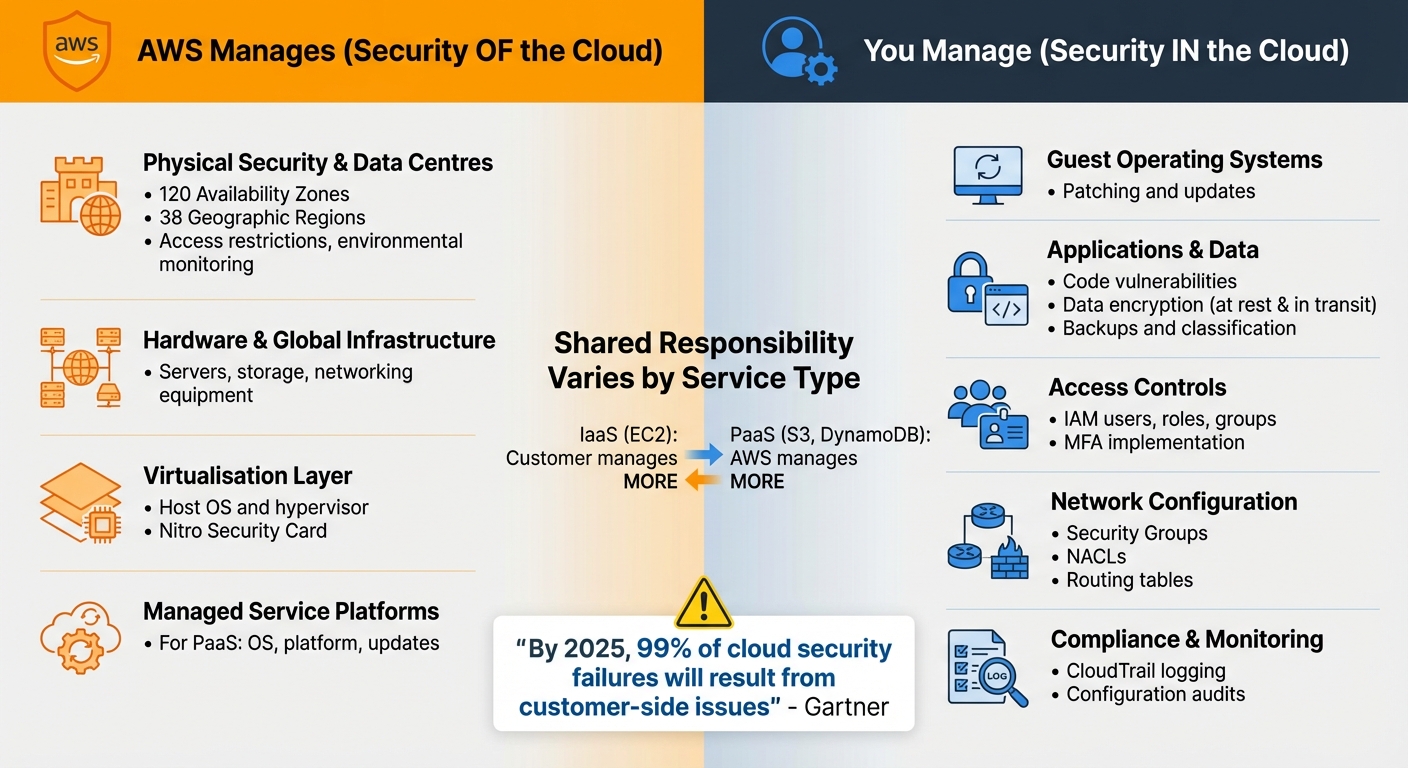
AWS Shared Responsibility Model: What AWS Manages vs What You Manage
AWS Shared Responsibility Model - Who Secures What in the Cloud?
What AWS Manages
AWS takes charge of the core infrastructure that powers its cloud services. This includes physical hardware, networking equipment, and the virtualisation software that forms the backbone of its platform. AWS is responsible for safeguarding the infrastructure that runs its services - covering hardware, software, networking, and the facilities that host AWS Cloud operations.
For small and medium-sized businesses (SMBs), this means you benefit from AWS's physical and environmental controls without needing to conduct your own data centre audits. AWS operates 120 Availability Zones across 38 Geographic Regions, with each zone designed to ensure high availability through redundant networking and physical isolation. To verify these controls, you can use AWS Artifact, which grants access to third-party audit reports like SOC and PCI DSS attestations. This solid foundation allows you to focus on configuring and managing your cloud environment.
Physical Security and Data Centres
AWS goes beyond infrastructure management by implementing strict physical security measures at its data centres. These measures include access restrictions, environmental monitoring, and robust power and cooling systems. Every facility adheres to stringent security standards.
However, there’s an important distinction for AWS Outposts. With Outposts, AWS provides managed hardware installed at your premises, but you’re responsible for securing the physical environment. While AWS equips the hardware with protections like the Nitro Security Card, you’ll need to handle aspects such as physical security, cooling, and power.
Networking and Virtualisation Layers
AWS also takes responsibility for securing its networking hardware, including routers, switches, and the global fibre network that connects its regions. Availability Zones are interconnected through a network designed for low latency, high throughput, and redundancy.
On the virtualisation front, AWS manages the host operating system and the hypervisor, ensuring that customers’ resources remain isolated and secure. This includes patching and maintaining the configuration of its infrastructure devices.
For fully managed services like Amazon S3 or DynamoDB, AWS handles the operating system and platform layers, leaving you free to focus on managing your data and access permissions. For Infrastructure as a Service (IaaS) offerings like EC2, AWS maintains the underlying layers, while you take care of the guest operating system.
What SMBs Must Manage
While AWS takes care of the infrastructure, everything you build on it is your responsibility. This includes your guest operating system, application software, and data - essentially, you're in charge of security within the cloud. For small and medium-sized businesses (SMBs), this means tasks like patching systems, setting up firewalls, managing user access, and ensuring compliance with regulations.
You'll need to classify your data, choose encryption methods for both data at rest and in transit, and maintain data integrity with regular backups. Network configuration is another critical area, involving the management of Security Groups, Network Access Control Lists (NACLs), and routing tables. On top of that, training your team on security best practices is a must. Let’s break down some of the key areas where your attention is required.
| Responsibility Category | Your Responsibility | AWS Responsibility |
|---|---|---|
| Physical Security | None (Inherited) | Data centres, hardware, and global infrastructure |
| Patch Management | Guest OS and Applications | Infrastructure and host OS |
| Configuration | Guest OS, Databases, and Apps | Infrastructure devices |
| Data Security | Encryption, classification, and backups | Protection of underlying storage hardware |
| IAM | Managing users, groups, roles, and MFA | Maintaining the IAM service infrastructure |
Application and Data Security
Once your core infrastructure is configured, securing your applications and data becomes the next priority. Begin by patching the guest operating system and addressing any vulnerabilities in your application code. Use AWS’s Security Group firewalls to manage traffic at the instance level.
For data protection, encryption is key. Use AWS Key Management Service (KMS) to secure data at rest, and enforce SSL/TLS protocols to safeguard data in transit. A solid backup strategy is equally important - consider daily incremental backups and weekly full backups using AWS Backup or Amazon S3 lifecycle policies.
When setting up Security Groups, avoid risky configurations like permitting SSH access on Port 22 to all IP addresses (0.0.0.0/0). Instead, restrict access to specific IP ranges to minimise exposure.
Access Management and IAM
After securing your applications, focus on managing access to your environment. Identity and Access Management (IAM) is the cornerstone of controlling who can access your AWS resources and what they can do. For added security, use an identity provider for temporary, federated access instead of relying on long-term IAM credentials. Similarly, applications and backend processes should use IAM roles to obtain temporary credentials rather than embedding access keys.
Limit the use of the root account to initial setup and critical tasks only. Enable Multi-Factor Authentication (MFA) for the root account and all IAM users with console access. To maintain tight control, use IAM Access Analyzer to review permission usage and enforce the principle of least privilege - giving each role only the permissions it absolutely needs. Regularly audit your environment using the "last accessed information" feature to identify and remove unused users, roles, and credentials.
Meeting Regulatory Requirements
To meet compliance standards, align your technical safeguards with frameworks like GDPR, SOC 2, or ISO 27001. AWS provides a range of tools to help you achieve this. For example, activate Amazon GuardDuty in all regions to detect threats and use AWS Security Hub for centralised compliance checks. AWS CloudTrail offers the audit logging required by most frameworks, while AWS Config helps track configuration changes over time.
| Compliance Task | Recommended AWS Tool | Regulatory Standard |
|---|---|---|
| Access Control | AWS IAM / MFA | GDPR, SOC 2, ISO 27001 |
| Data Encryption | AWS KMS / CloudHSM | GDPR, HIPAA, PCI DSS |
| Audit Logging | AWS CloudTrail | SOC 2, ISO 27001 |
| Threat Detection | Amazon GuardDuty | SOC 2 |
| Compliance Reporting | AWS Artifact | All major frameworks |
| Configuration Audit | AWS Config | SOC 2, GDPR |
While AWS provides the tools, it’s up to you to configure them correctly to meet your specific regulatory requirements. Proper setup is the final piece of the puzzle in building a compliant and secure environment.
How Responsibilities Change by Service Type
When working with AWS, the type of service you choose plays a big role in shaping your security responsibilities. While AWS handles certain aspects, your duties can vary significantly depending on whether you're using IaaS (Infrastructure as a Service) or PaaS (Platform as a Service).
Using IaaS services like Amazon EC2 means you’re in charge of everything from the guest operating system upwards. This includes patching, applying security updates, and managing application software. AWS takes care of the physical infrastructure, but the virtual machine is entirely your responsibility. For small and medium-sized businesses (SMBs), this approach allows IT teams to focus their limited resources on specific areas, although it does require more hands-on involvement.
On the other hand, PaaS or abstracted services like Amazon S3 or DynamoDB shift much of the burden to AWS. They handle the operating system, platform, and updates, leaving you to focus on data classification, encryption, and managing IAM (Identity and Access Management) permissions. This setup is particularly helpful for SMBs with lean IT teams because it reduces the workload, enabling your team to prioritise safeguarding your data and applications rather than spending time on platform maintenance.
Service Model Comparison
Here’s a breakdown of how responsibilities differ between IaaS and PaaS:
| Responsibility Layer | IaaS (e.g., Amazon EC2) | PaaS/Abstracted Services (e.g., S3, DynamoDB) |
|---|---|---|
| Hardware & Global Infrastructure | AWS | AWS |
| Virtualisation Layer | AWS | AWS |
| Operating System | Customer (Guest OS) | AWS |
| Network Configuration | Customer-managed (Security Groups) | AWS (Platform level) |
| Application/Platform | Customer | AWS |
| Customer Data | Customer | Customer |
| Identity & Access (IAM) | Customer | Customer |
| Data Encryption | Customer | Customer |
No matter which service model you opt for, data security and identity management are always your responsibility. Whether you're managing virtual machines or using fully managed services, these aspects remain critical and must be prioritised to ensure your operations are secure.
AWS Tools for SMB Security and Compliance
AWS offers a range of tools designed to help small and medium-sized businesses (SMBs) tackle their security and compliance needs without requiring extensive IT resources or hefty budgets. These tools automate many of the time-consuming tasks traditionally managed manually, allowing you to focus on growing your business while maintaining a strong security framework. By using these AWS services, SMBs can effectively handle their responsibilities within the shared responsibility model.
These tools simplify key security and compliance tasks. Whether it’s managing access control, tracking configuration changes, or securing your network perimeter, AWS provides integrated solutions that seamlessly fit into your existing setup. Many of these services are offered at no extra cost, making them especially appealing for businesses with limited resources.
AWS Identity and Access Management (IAM)
When it comes to access management, AWS provides solutions to make the process both secure and straightforward. At the core of AWS security is IAM, which determines who can access your resources and what actions they’re allowed to perform. For SMBs, IAM Identity Centre (formerly AWS SSO) offers a centralised way to manage access across multiple AWS accounts and applications.
IAM Access Analyzer takes things further by helping you create least-privilege policies based on actual CloudTrail activity. It also flags resources with unintended public or cross-account access, helping you catch potential vulnerabilities early. To enhance security, you can use IAM roles and federation to limit the attack surface of your environment.
If you’re managing multiple AWS accounts, AWS Organizations allows you to enforce Service Control Policies (SCPs). These policies act as guardrails, restricting certain actions across your entire organisation from a single control point.
AWS CloudTrail and Config
AWS CloudTrail and Config work hand-in-hand to give you a detailed view of your AWS environment. CloudTrail logs every API call and activity in your account, providing a complete audit trail, while Config continuously monitors your resource configurations, ensuring they align with your security requirements. These tools are particularly useful for demonstrating compliance with regulations like GDPR or the UK Data Protection Act 2018, as they offer encrypted and tamper-proof log files.
If a resource falls out of compliance - such as an S3 bucket accidentally becoming publicly accessible or an RDS database losing encryption - Config can trigger automated alerts or remediation actions. This proactive approach helps stop potential issues before they escalate. Together, CloudTrail and Config complement your network controls to create a robust security strategy.
Security Groups and Network Controls
Security groups act as virtual firewalls for your EC2 instances and other resources, controlling inbound and outbound traffic. Their stateful nature means that return traffic is automatically allowed, simplifying rule management compared to traditional firewalls.
By default, security groups block all incoming traffic, so you’ll need to explicitly define "allow" rules. It’s best practice to avoid exposing administrative ports to the open internet and to use Security Group IDs instead of specific IP addresses when configuring rules.
Here’s a quick comparison of Security Groups and Network ACLs (Access Control Lists):
| Feature | Security Groups | Network ACLs |
|---|---|---|
| Scope | Instance level (Virtual Firewall) | Subnet level |
| State | Stateful (Return traffic is allowed) | Stateless (Return traffic must be explicitly allowed) |
| Rule Type | Allow rules only | Allow and Deny rules |
| Default | Denies all traffic by default | Allows all traffic by default (in default NACL) |
For an added layer of defence, combine Security Groups with Network ACLs at the subnet level. Enabling VPC Flow Logs provides insights into traffic patterns, helping you evaluate the effectiveness of your configurations. To stay secure, consider performing quarterly audits of your security group settings to identify and remove overly permissive rules that may have been added over time.
Conclusion
The AWS Shared Responsibility Model provides a clear breakdown of what AWS manages versus what you, as an SMB, need to handle. AWS takes care of the security of the cloud, including the physical infrastructure, networking, and virtualisation layers. Meanwhile, you are responsible for securing what’s in the cloud - your data, applications, and access controls. This distinction is crucial for maintaining both security and compliance.
Your specific responsibilities vary depending on the AWS service you’re using. For example, with services like EC2 (Infrastructure as a Service), you’ll manage tasks such as patching the guest operating system, configuring firewalls, and applying updates. On the other hand, with services like S3 or DynamoDB, AWS manages the platform itself, leaving you to focus on tasks like setting permissions and classifying data.
Here’s a sobering statistic: 75% of SMBs would survive less than a week after a significant digital incident or data loss if they lack a strong defence plan. Alarmingly, 30% of SMBs have no plan in place at all. These numbers highlight that understanding and acting on your security responsibilities isn’t just about compliance - it’s about keeping your business alive. The risks demand immediate action.
To get started, implement these key practices:
- Enable multi-factor authentication (MFA).
- Use IAM to enforce least-privilege access.
- Encrypt data at rest and in transit using AWS KMS.
- Turn on CloudTrail for continuous monitoring.
As AWS documentation advises:
"A user (or service) should have the exact access rights necessary to complete their role's responsibilities - no more, no less".
Enhance your defences by combining Security Groups with Network ACLs and scheduling automated backups.
Security is not a one-time effort. Regularly review and update your security groups, perform Well-Architected Reviews, and stay on top of patches and updates. By taking these steps and managing your part of the shared responsibility model, you can create a secure and resilient AWS environment that protects your business and supports growth.
For more personalised advice on how to optimise AWS for SMBs, visit AWS Optimization Tips, Costs & Best Practices for Small and Medium Sized Businesses.
FAQs
What are the key security responsibilities for SMBs when using AWS IaaS compared to PaaS?
When using Infrastructure-as-a-Service (IaaS) on AWS, small and medium-sized businesses (SMBs) are responsible for securing everything above the virtual machine. This means they need to manage the guest operating system (like keeping it updated and patched), middleware, application software, network security (such as firewalls and access control lists), data encryption (both at rest and in transit), and identity and access management (IAM) policies and keys. Essentially, everything related to the operating system, workloads, and data falls under the SMB's responsibility.
With Platform-as-a-Service (PaaS), AWS takes on a larger share of the security burden. The operating system, runtime, and underlying infrastructure are all managed by AWS. SMBs, on the other hand, only need to focus on securing their applications, data, and IAM roles. This includes tasks like managing encryption, application-level security, and specific service settings, such as database access controls. AWS handles tasks like OS patching and securing the infrastructure, which significantly reduces the workload for SMBs.
In short, IaaS requires SMBs to take on more security responsibilities, while PaaS offloads much of that work to AWS, letting SMBs concentrate on safeguarding their applications, data, and access controls.
How can small and medium-sized businesses (SMBs) use AWS tools like IAM and CloudTrail to enhance security and ensure compliance?
Small and medium-sized businesses (SMBs) can boost their security and stay compliant on AWS by taking some essential steps. Start with multi-factor authentication (MFA) to add an extra layer of protection. Combine that with least-privilege IAM policies to ensure users only have access to what they absolutely need. Incorporating role-based access control further tightens security by assigning permissions based on specific roles within your team.
Another key practice is to regularly review and rotate credentials. This reduces the risk of unauthorised access and keeps your system more secure over time.
To keep track of what's happening in your environment, enable AWS CloudTrail. This service logs all API activity and securely stores it, for example, in encrypted Amazon S3 buckets. By monitoring these logs - either through alerts or automated tools - you can quickly identify and respond to suspicious activity, helping to safeguard your operations from potential threats.
Why is it important for small and medium-sized businesses to understand the AWS Shared Responsibility Model?
Understanding the AWS Shared Responsibility Model is essential for small and medium-sized businesses (SMBs) because it clearly outlines how security tasks are divided between AWS and its customers. AWS takes care of the security of the cloud, which includes managing the physical infrastructure and hardware. On the other hand, customers are responsible for security in the cloud - this means tasks like keeping operating systems up to date, configuring firewalls, and protecting applications.
When SMBs understand their responsibilities within this model, they can take the right steps to safeguard their data, meet compliance standards, and avoid security gaps that could lead to expensive problems. This clarity allows businesses to make the most of AWS while ensuring their cloud environment remains secure and dependable.