AWS Network Security for GDPR and HIPAA Compliance
AWS network controls, firewalls, logging and encryption to help SMBs meet GDPR and HIPAA compliance.
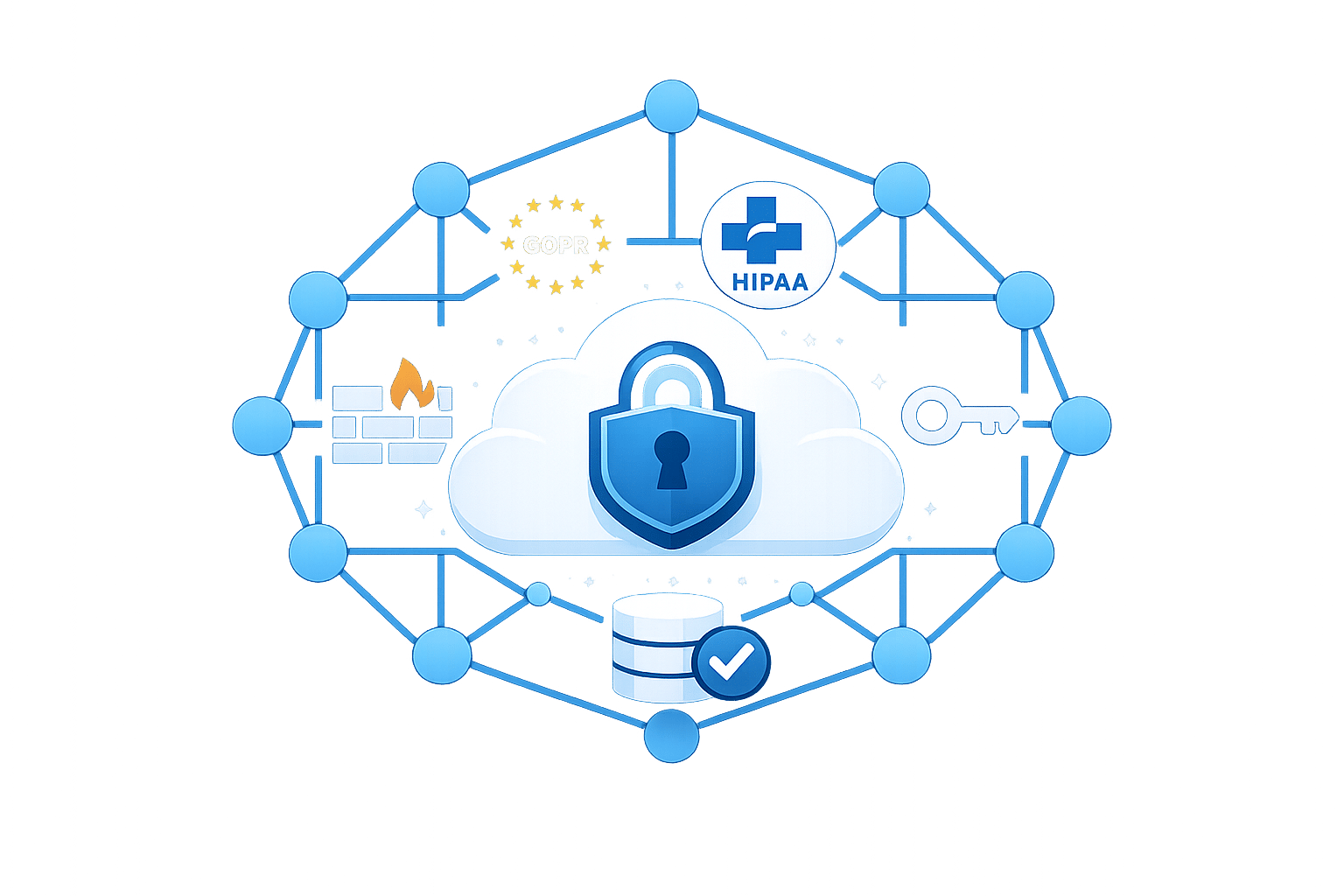
AWS makes GDPR and HIPAA compliance easier for small and medium-sized businesses (SMBs). With tools like Security Hub, GuardDuty, and Config, AWS helps manage network security, monitor activity, and meet strict data protection rules - without needing custom solutions.
Here’s what you need to know:
- GDPR: Focuses on protecting EU citizens' personal data. Key measures include encryption, access controls, and data residency. AWS supports this with VPC isolation, TLS encryption, and IAM for least privilege access.
- HIPAA: Targets US healthcare data (ePHI). Requires a Business Associate Agreement (BAA) with AWS, encryption (e.g., KMS), and private subnet isolation for sensitive workloads.
Key AWS services for compliance:
- VPC: Isolate and segment networks for secure data handling.
- AWS Network Firewall: Monitors all VPC traffic, prevents data leaks, and blocks threats.
- AWS WAF: Protects web apps from attacks like SQL injection and XSS.
- CloudTrail & VPC Flow Logs: Track and audit activity to ensure compliance.
For SMBs, AWS also offers cost-effective AWS services like S3 Glacier for long-term log storage and free tools like AWS Certificate Manager for encryption. Combining these services ensures strong security while staying within budget.
Achieving Healthcare Data Security: AWS HIPAA Compliant Architecture Explained
GDPR and HIPAA Network Security Requirements
GDPR and HIPAA both require strong security measures but focus on different aspects. GDPR applies to organisations handling the personal data of EU citizens, prioritising privacy, data residency, and individual rights. On the other hand, HIPAA targets the US healthcare sector, ensuring the confidentiality, integrity, and availability of electronic Protected Health Information (ePHI) that covered entities create, receive, maintain, or transmit.
In the shared responsibility model, AWS secures its physical infrastructure, while customers are responsible for managing VPC security, guest operating systems, and data encryption. This division allows organisations to implement network security measures tailored to GDPR and HIPAA compliance requirements.
GDPR Network Security Requirements on AWS
GDPR mandates technical safeguards like encryption, access controls, and data residency to protect personal data. AWS supports these needs with encryption in transit using TLS/HTTPS across its APIs and simplifies certificate management through AWS Certificate Manager (ACM). Secure site-to-cloud connections are facilitated via VPN or AWS Direct Connect.
To isolate data, AWS offers Amazon VPC, which creates a logically separated section of the cloud. Networks can be segmented into public, private, and isolated subnets, protecting sensitive data. Access control can be enforced using a Zero Trust model with AWS Identity and Access Management (IAM) and Multi-Factor Authentication (MFA), ensuring least privilege access.
AWS Config and Security Hub can automate compliance checks and provide continuous monitoring for GDPR requirements. For network security, adopt a "deny-all" approach in Security Groups and ACLs, explicitly allowing only necessary ports and IP ranges. These configurations align with GDPR-driven security models and an AWS security checklist for SMBs.
HIPAA Network Security Requirements on AWS
HIPAA introduces specific requirements for safeguarding ePHI. Healthcare organisations must sign a Business Associate Agreement (BAA) with AWS via AWS Artifact before processing PHI. This agreement ensures AWS adheres to HIPAA standards and restricts PHI processing to over 166 HIPAA-eligible AWS services.
"The HIPAA Security Rule requires that covered entities and their business associates protect the confidentiality, integrity and availability of PHI that is created, transmitted, received or maintained with administrative, physical and technical controls." - Amazon Web Services
Encrypting PHI in transit is achieved through HTTPS and SSL/TLS, while AWS Key Management Service (KMS) manages encryption keys for data at rest in services like Amazon EBS, S3, and RDS. Tools like AWS CloudTrail and VPC Flow Logs provide audit trails to monitor PHI access. Notably, in 2024, the healthcare sector reported over 700 data breaches, affecting approximately 186 million records.
For additional protection, deploy ePHI resources in private VPC subnets without public IPs. Use Amazon GuardDuty to analyse VPC Flow Logs for potential data exfiltration. These measures complement AWS configurations designed to meet HIPAA compliance standards.
AWS VPC Deployment Models for Compliance
Amazon VPC provides a logically isolated virtual network within the AWS Cloud, which is essential for meeting data protection standards like GDPR and HIPAA. The architecture you implement can significantly influence your ability to limit breaches and control lateral movement within your environment.
VPC Isolation and Segmentation
A multi-tier subnet architecture is a key strategy for protecting sensitive workloads through network segmentation. Public subnets are used for internet-facing resources, such as Application Load Balancers and Bastion hosts. Private subnets are designed for application servers, which connect to the internet only through NAT Gateways for outbound traffic. Meanwhile, isolated or data subnets are reserved for highly sensitive data under GDPR and HIPAA, with no external routes. These subnets communicate strictly within the VPC or via VPC Endpoints.
To meet compliance availability requirements, subnets should span at least two (preferably three) Availability Zones, ensuring failover can occur within 30 seconds. Keep in mind that AWS reserves five IP addresses in each subnet for internal networking, so plan your CIDR blocks accordingly.
For secure connectivity to AWS services like S3 or KMS, leverage AWS PrivateLink and VPC Endpoints. These tools ensure traffic remains within private IP ranges, avoiding the public internet. This approach not only reduces the attack surface but can also lower data egress costs with optimization strategies. When defining CIDR blocks, choose non-overlapping RFC 1918 private address ranges (e.g., 10.0.0.0/16 for production) to avoid routing conflicts.
The next section explores how instance-level and subnet-level controls enhance these architectural choices.
Security Groups vs NACLs: A Comparison
Once your segmented architecture is in place, managing traffic at the instance and subnet levels becomes critical. Here's how Security Groups and Network ACLs (NACLs) differ in their functionality:
- Security Groups operate at the instance or Elastic Network Interface (ENI) level and are stateful, meaning return traffic is automatically allowed. They only support allow rules, and all rules are evaluated before permitting traffic. For better flexibility, use Security Group referencing instead of hardcoding IP ranges. For example, you can allow database access only from the App Server Security Group ID.
- Network ACLs, on the other hand, function at the subnet level and are stateless. This means you must explicitly allow both inbound and outbound traffic, including return traffic on ephemeral ports (32768–65535). NACLs support both allow and deny rules, which are evaluated in ascending numerical order until a match is found. They act as an additional layer of protection, blocking specific malicious IP ranges at the subnet boundary.
| Feature | Security Groups | Network ACLs |
|---|---|---|
| Level of Operation | Instance/ENI level | Subnet level |
| Statefulness | Stateful (return traffic allowed) | Stateless (explicit rules needed) |
| Rule Types | Allow rules only | Allow and deny rules |
| Evaluation | All rules evaluated | Rules evaluated in order |
| Primary Use | Granular workload access control | Subnet-level traffic control |
To strengthen security, adopt a default deny-all policy for both mechanisms and allow only the traffic that is strictly necessary. Use AWS Config to keep an eye on security group settings, automatically flagging unrestricted SSH access on port 22. You can also use AWS Trusted Advisor for performance and security checks to ensure your configuration remains compliant. Additionally, enable VPC Flow Logs for all subnets handling sensitive data to maintain an audit trail for compliance reviews.
Network Protection with AWS Network Firewall and WAF
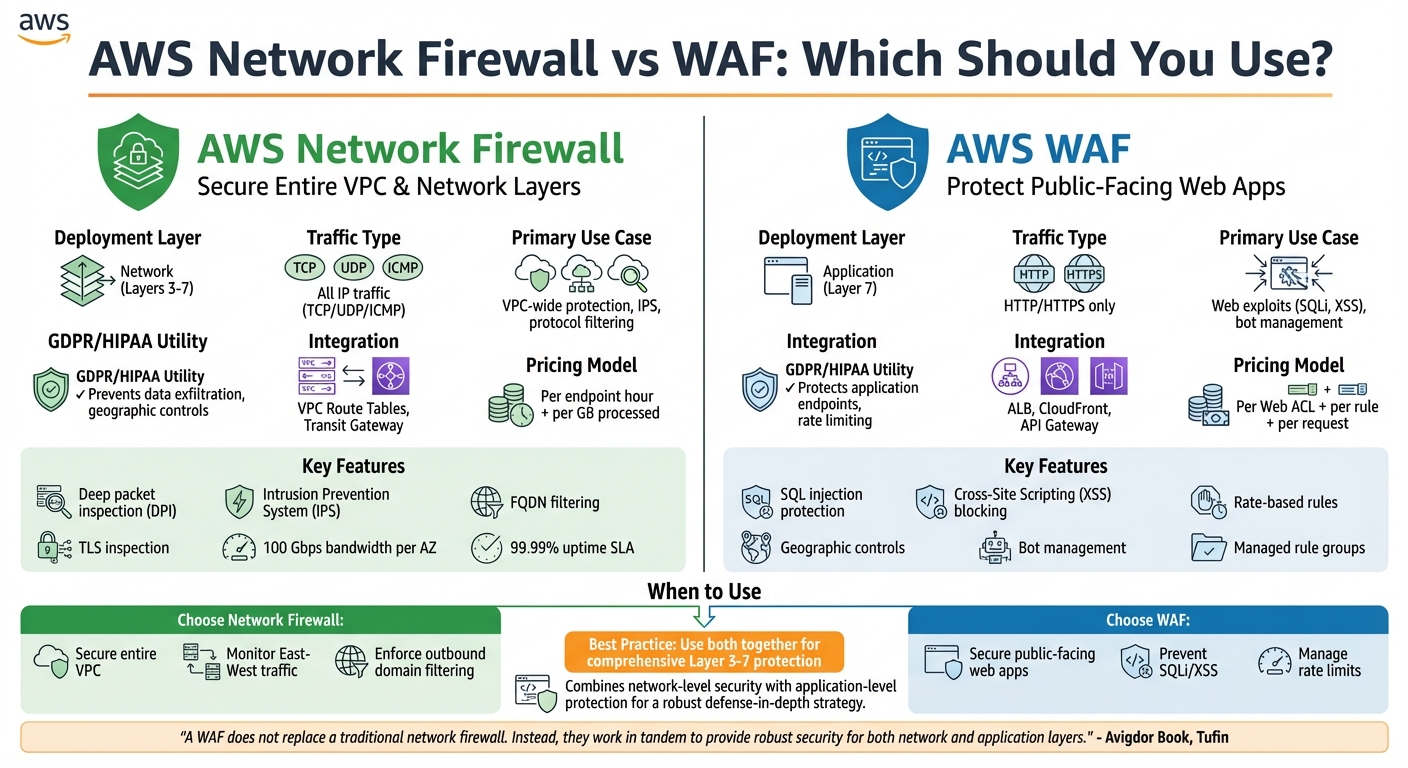
AWS Network Firewall vs WAF: Feature Comparison for GDPR and HIPAA Compliance
Once you've set up a segmented VPC and implemented instance-level controls, the next step is to add advanced firewall solutions for a deeper level of traffic inspection. AWS Network Firewall and AWS WAF each address specific aspects of network security, and knowing when to use them is key for staying compliant with regulations like GDPR and HIPAA.
AWS Network Firewall Features
AWS Network Firewall is a fully managed service designed to inspect traffic across Layers 3 to 7 for your entire VPC. It’s particularly helpful for small to medium-sized businesses (SMBs) that may lack dedicated security teams, as AWS takes care of infrastructure deployment, maintenance, and updates. The service supports bandwidth scaling up to 100 Gbps per Availability Zone and comes with a 99.99% uptime SLA.
With deep packet inspection (DPI), the firewall can analyse traffic based on protocols, ports, and IP addresses. This is vital for protecting sensitive data like health information (under HIPAA) or personal data (under GDPR). It also includes an Intrusion Prevention System (IPS) that uses signature-based detection to block threats in real time. For preventing data leaks, features like FQDN filtering and outbound URL filtering are available. Additionally, geographic traffic controls allow you to restrict data movement to comply with GDPR’s data sovereignty rules.
TLS inspection is another feature that lets the firewall examine encrypted traffic to detect hidden threats. However, this comes with additional costs: £0.40–£0.58 per hour (depending on the region), plus endpoint fees of £0.32 per hour and data processing charges of £0.053 per GB. Managed rule groups for active threat defence add an extra £0.004 per GB.
To optimise costs, consider chaining AWS Network Firewall with a NAT Gateway in the same path. By leveraging AWS-managed threat signatures and domain lists, you can tap into Amazon's global threat intelligence without needing to create custom rules. For businesses managing multiple VPCs, AWS Firewall Manager simplifies compliance and centralised policy enforcement. These features make AWS Network Firewall a scalable and cost-effective choice for meeting GDPR and HIPAA requirements.
Next, let's explore how AWS WAF secures applications at the application layer.
WAF Rules for Application Layer Protection
AWS WAF operates at Layer 7, focusing specifically on HTTP and HTTPS traffic for resources like Application Load Balancers, API Gateway, and CloudFront. It’s designed to block web-specific threats, including SQL injection and Cross-Site Scripting (XSS), which could otherwise expose Protected Health Information (PHI) or personal data.
For GDPR compliance, AWS WAF acts as a technical safeguard, filtering and monitoring HTTP traffic to ensure only authorised users access sensitive endpoints. Under HIPAA, it helps maintain availability by using rate-based rules to prevent brute-force attacks and application-layer DDoS. Geographic controls also allow you to block or allow traffic based on its origin, supporting both GDPR and HIPAA requirements.
SMBs can benefit from using AWS or partner-managed rules to secure applications without the need for manual configurations. Comprehensive logging to Amazon S3, CloudWatch, or Kinesis Data Firehose ensures you have the audit trails required for regulatory compliance. Additionally, AWS Config rules like alb-http-to-https-redirection-check can enforce encryption for all application traffic.
Pricing for AWS WAF is based on the number of Web Access Control Lists (Web ACLs), rules per ACL, and the volume of web requests processed. This predictable pricing model makes it a practical choice for SMBs looking to secure specific applications rather than their entire network.
Network Firewall vs WAF: Which to Use?
The decision between AWS Network Firewall and AWS WAF depends on what you’re protecting and where potential threats might arise.
- Choose AWS WAF for securing public-facing web applications against common threats like SQL injection, XSS, and bot traffic. It’s also ideal for managing rate limits to ensure your application remains available.
- Choose AWS Network Firewall to secure your entire VPC, monitor "East-West" traffic between subnets, or enforce outbound domain filtering to prevent unauthorised data transfers.
"A WAF does not replace a traditional network firewall. Instead, they work in tandem to provide robust security for both network and application layers." - Avigdor Book, Tufin
Here’s a quick comparison to highlight their key differences:
| Feature | AWS Network Firewall | AWS WAF |
|---|---|---|
| Deployment Layer | Network (Layers 3-7) | Application (Layer 7) |
| Traffic Type | All IP traffic (TCP/UDP/ICMP) | HTTP/HTTPS only |
| Primary Use Case | VPC-wide protection, IPS, protocol filtering | Web exploits (SQLi, XSS), bot management |
| Integration | VPC Route Tables, Transit Gateway | ALB, CloudFront, API Gateway |
| GDPR/HIPAA Utility | Prevents data exfiltration, geographic controls | Protects application endpoints, rate limiting |
| Pricing Model | Per endpoint hour + per GB processed | Per Web ACL + per rule + per request |
For organisations handling GDPR or HIPAA-regulated data, combining both services provides comprehensive protection. Together, they secure both network and application layers, ensuring compliance with stringent regulatory standards.
Compliance Through Logging, Monitoring, and Encryption
To strengthen compliance efforts, logging, monitoring, and encryption play a critical role alongside network firewalls and access controls. These elements provide essential audit trails and safeguard data, meeting the demands of regulations like GDPR and HIPAA.
Logging and Monitoring with VPC Flow Logs and CloudTrail
AWS CloudTrail creates a detailed record of every API call within your AWS environment. This comprehensive log of actions is vital for demonstrating accountability under GDPR and HIPAA. For example, CloudTrail can detect when external credentials attempt to access private VPC endpoints, helping you identify unauthorised access before it becomes a larger issue.
VPC Flow Logs, on the other hand, capture metadata about IP traffic, such as source and destination addresses, protocols, and ports. This data enables small and medium-sized businesses (SMBs) to identify suspicious access patterns or potential data exfiltration attempts. Additionally, Amazon GuardDuty analyses these logs using machine learning to flag malicious activities, such as communication with known threat actors.
When it comes to storing logs, Amazon S3 offers a more cost-effective solution than CloudWatch Logs for large-scale data, such as 15 TB/month. For long-term compliance, particularly for HIPAA’s 6–7 year retention requirements, S3 lifecycle policies can automatically transition older logs to Glacier for archival storage.
"Determining the optimal logging approach for your organization... involves striking a balance between your security and compliance requirements and the costs associated with implementing solutions." - AWS Security Blog
To meet HIPAA’s specific requirement for log integrity, enable CloudTrail log file validation to ensure audit files remain unaltered. Additionally, setting up CloudTrail as a multi-region trail ensures comprehensive activity tracking across your AWS infrastructure. Use IAM roles to restrict log access to authorised personnel, such as compliance officers, further strengthening security. This level of detail integrates seamlessly with encryption strategies for protecting data.
Encryption in Transit with TLS and AWS KMS
Encryption ensures that data remains secure when transferred, complementing the visibility provided by logging and monitoring. AWS Certificate Manager (ACM) simplifies the management of SSL/TLS certificates, including their generation, deployment, and rotation. It integrates easily with Elastic Load Balancing to secure application traffic.
For HIPAA compliance, database connections (e.g., to Amazon RDS) must use SSL/TLS encryption in transit. In hybrid environments, private connectivity can be secured with IPsec VPN connections or AWS Direct Connect paired with Site-to-Site VPN.
AWS Key Management Service (KMS) handles encryption keys for securing log data stored in S3 or CloudWatch Logs. Customer-managed keys (CMKs) provide the enhanced control and audit capabilities required by compliance frameworks. Using CloudTrail, you can monitor KMS actions, such as CreateKey or ListKeys, and filter for error codes like VpceAccessDenied to identify potential security issues.
HIPAA-compliant architectures often come with additional costs due to requirements for encryption, advanced monitoring, and dedicated infrastructure. For workloads involving Protected Health Information (PHI), EC2 dedicated instances or dedicated hosts are necessary to ensure physical isolation, as shared tenancy is not allowed under HIPAA. To enforce encryption, configure S3 bucket policies to deny non-HTTPS traffic, ensuring all data transfers remain secure.
For more tips on optimising AWS for SMBs, including cost management and best practices, check out AWS for SMBs by Critical Cloud.
Cost-Effective Compliance Strategies for SMBs
Optimising AWS Costs for Network Security
After setting up strong network security measures, keeping costs manageable is essential for small and medium-sized businesses (SMBs) aiming to maintain compliance. For SMBs, the challenge lies in balancing tight budgets with robust security needs. Native AWS services offer a practical solution by removing the need for custom-built compliance tools and simplifying integration processes.
Services like AWS Security Hub, Amazon GuardDuty, and Amazon Inspector automate security checks and detect threats without requiring constant manual attention. By leveraging these tools, many SMBs have significantly reduced the time spent on managing security, freeing up their teams to focus on enhancing customer experience. For example, Authority Brands used AWS Control Tower and IAM to securely manage a multi-account setup, supporting their machine learning-driven analytics while maintaining proper governance.
When it comes to log retention, CloudWatch can be configured to keep critical security logs for 90 days and operational logs for 30 days - this setup meets the requirements of most compliance standards. For long-term data storage, particularly for regulations like HIPAA that require 6–7 years of retention, S3 Glacier is an ideal choice. Additionally, AWS Certificate Manager paired with Amazon Route 53 allows SMBs to obtain and manage SSL/TLS certificates at no cost, eliminating recurring certificate expenses.
The Landing Zone Accelerator on AWS is another handy tool, offering a low-code approach to deploy essential capabilities across more than 35 AWS services. This aligns with a variety of global compliance frameworks. By taking proactive steps, SMBs can address 80% to 90% of their security requirements. Using the Three Lines Model can also help manage compliance efficiently:
- First line: Manage risks through IAM policies.
- Second line: Monitor risks with AWS Config and CloudTrail.
- Third line: Automate evidence collection for audits.
For more detailed advice on striking the right balance between compliance and cost, check out the resources below.
AWS Critical Cloud for SMB Security Insights
In addition to configuring tools, having a well-thought-out strategy is vital for managing costs and ensuring compliance. For expert advice tailored to SMBs, visit AWS for SMBs by Critical Cloud. The blog covers practical strategies for designing cloud architecture, implementing security, and controlling costs in AWS environments. Topics include automated resource management, optimising infrastructure, and using serverless solutions to handle unpredictable workloads - all essential for achieving GDPR and HIPAA compliance on a budget.
Conclusion
Ensuring GDPR and HIPAA compliance on AWS hinges on understanding the Shared Responsibility Model. AWS takes care of securing the physical infrastructure, but small and medium-sized businesses (SMBs) need to manage configurations like network isolation, encryption, and access controls. These measures, combined with the tools mentioned earlier, are essential for safeguarding sensitive data. Also, don’t forget to sign a Business Associate Agreement (BAA) with AWS before dealing with Protected Health Information (PHI). For HIPAA-related workloads, Dedicated Instances or Dedicated Hosts are mandatory.
To put these principles into action, consider isolating sensitive workloads using private VPC subnets and maintaining detailed audit trails with VPC Flow Logs and CloudTrail across all regions. Automating compliance checks becomes easier with the HIPAA Security Rule conformance pack in AWS Config. Encryption should remain a top priority for both data at rest and in transit.
For SMBs working with limited budgets, AWS offers tools like Security Hub, GuardDuty, and Inspector, which automate threat detection and reduce the need for manual intervention. Cost-saving strategies such as using Gateway Endpoints for S3 and DynamoDB (which are free) or replacing NAT Gateways where feasible can help maintain strong security without overspending. These efficient and compliant setups allow SMBs to focus on their core business goals while adhering to regulatory requirements.
For more tips on AWS optimisation, costs, and best practices tailored to SMBs, check out AWS for SMBs by Critical Cloud.
FAQs
How can I quickly decide if I need AWS WAF, AWS Network Firewall, or both?
To make the right choice, consider your specific security requirements and the complexity of your network. If your priority is safeguarding web applications from threats such as SQL injection, AWS WAF is a solid option. For more advanced, network-level protection, including intrusion prevention, AWS Network Firewall is the way to go.
For comprehensive security, you can combine both tools: AWS WAF focuses on application-level threats, while AWS Network Firewall secures the broader network environment. Begin by addressing your most pressing concern - whether it's web application or network security - and build from there as your needs evolve.
How can I keep ePHI private on AWS without disrupting internet access for updates and dependencies?
To safeguard ePHI on AWS while keeping internet access for updates, it's crucial to manage traffic flow between network layers carefully. Use encryption to protect data in transit, and establish private connectivity through VPC endpoints or VPNs. For secure updates, rely on controlled pathways like VPC peering or private links. These steps help maintain compliance without sacrificing essential operational capabilities.
Which logs should I retain for GDPR and HIPAA, and how long should I keep them?
When addressing GDPR and HIPAA compliance, it’s crucial to retain specific logs that track various activities and ensure transparency. These include:
- CloudTrail logs: Capture API activity across your cloud environment.
- CloudWatch Logs: Record access and application activity.
- VPC Flow Logs: Monitor network traffic details.
The retention period for these logs should align with both regulatory requirements and your organisation’s security policies. This typically spans several months to years, depending on the compliance standards you’re adhering to and the operational demands of your business.