AWS Assume Role: Temporary Security Credentials Explained
Explains how AWS Assume Role issues temporary security credentials, their lifespan, security benefits versus long-term keys, and common use cases.

AWS Assume Role simplifies access to AWS resources by providing temporary credentials that expire automatically, reducing security risks compared to long-term keys. Here's what you need to know:
- Temporary credentials: Automatically expire (15 minutes to 12 hours) and are not stored with users.
- Long-term keys: Persistent until manually revoked, posing higher risks if leaked.
- Security: Temporary credentials lower exposure risks and support features like MFA and session policies.
- Management: Temporary credentials are easier to handle as they don't require manual rotation or storage in code.
- Use cases: Ideal for cross-account access, identity federation, and AWS compute services.
Quick Comparison
| Feature | Temporary Credentials (AWS Assume Role) | Long-Term Access Keys |
|---|---|---|
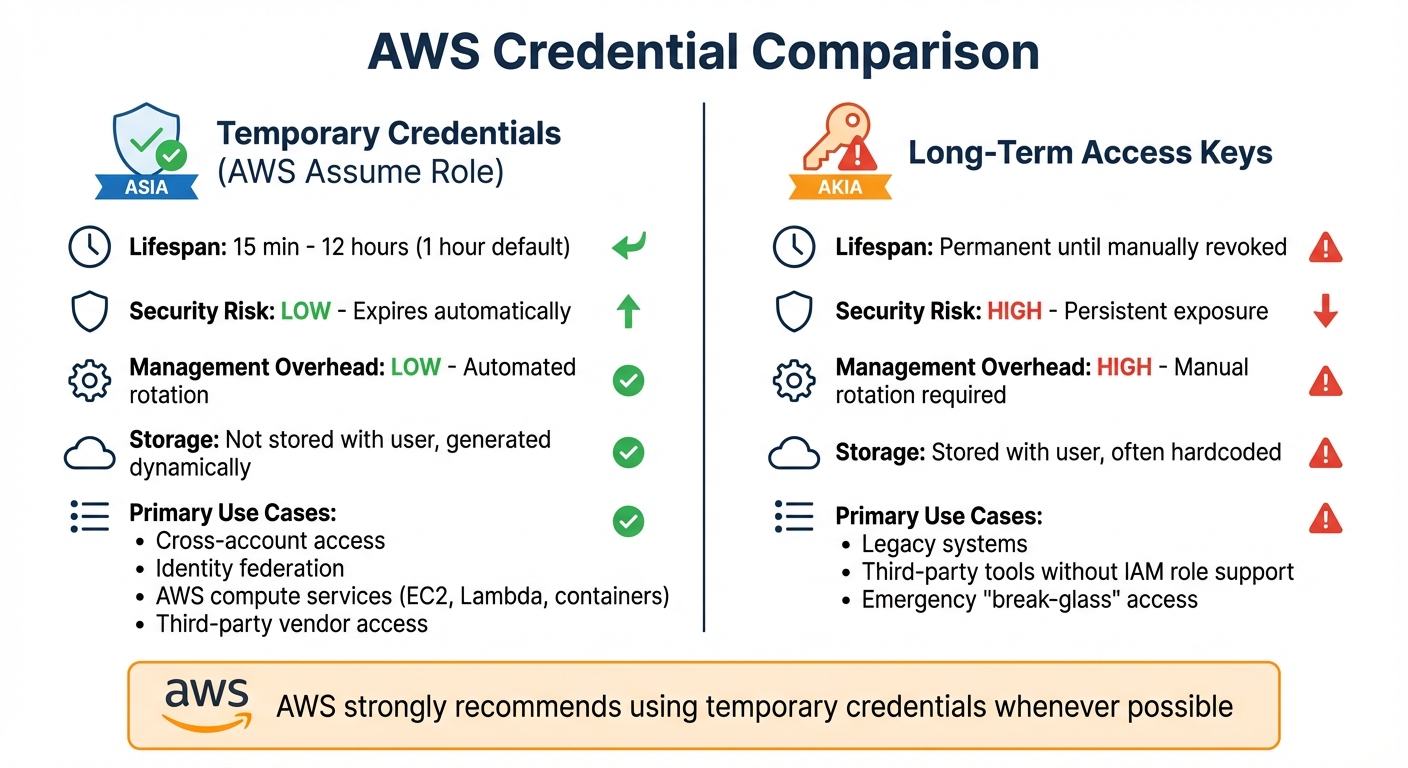
| Lifespan | 15 minutes to 12 hours | Permanent until revoked |
| Security Risk | Lower – expires automatically | Higher – persistent |
| Management Overhead | Lower – automated | Higher – manual rotation |
| Primary Use Cases | Cross-account access, compute services | Legacy systems, emergencies |
Temporary credentials are the safer, simpler choice for most scenarios, while long-term keys are better suited for legacy systems or emergency access. AWS strongly recommends using temporary credentials whenever possible.
AWS Temporary Credentials vs Long-Term Access Keys Comparison
AWS Assume IAM Role - Step by Step tutorial (Part-3)
1. AWS Assume Role with Temporary Security Credentials
AWS Assume Role offers a practical way to enhance security while reducing management complexity by using temporary credentials. Here’s a closer look at some key aspects of how it works.
Credential Lifespan
Temporary credentials typically last for 1 hour by default. However, you can adjust their lifespan using the DurationSeconds parameter, setting it anywhere from 15 minutes to 12 hours - subject to the role's maximum session duration. When chaining roles, sessions are capped at 1 hour, and you’ll need to make a new AssumeRole call once they expire. These time limitations play a crucial role in maintaining a strong security framework.
Security Implications
Short-lived credentials significantly reduce security risks. Since they aren’t stored in code or configuration files, the chances of exposure are minimised. Adding MFA to the AssumeRole process and applying session policies that follow the principle of least privilege can further heighten security. For third-party access, always include an ExternalId to mitigate the confused deputy problem.
"The unique advantage of AWS IAM roles lies in their ability to provide temporary, automatically managed security credentials that eliminate many of the security risks and operational complexities associated with permanent access keys." – cyber_pix
Management Overhead
With AWS Security Token Service (STS), temporary credentials are generated automatically, removing the need for manual rotation or distribution. AWS SDKs and the CLI handle credential refreshes seamlessly, making management much easier.
Use Cases
Temporary credentials are ideal for scenarios like cross-account access, identity federation with external providers, and generating dynamic credentials for services such as EC2, Lambda, or container-based applications. They also allow secure vendor access, with all actions meticulously logged in AWS CloudTrail for accountability.
2. Long-Term Access Keys
Long-term access keys, which start with the AKIA prefix, provide ongoing access to AWS resources until they are manually rotated or revoked. Each IAM user is allowed up to two such keys, consisting of an Access Key ID and a Secret Access Key.
Security Implications
The indefinite nature of long-term keys poses a major security risk if they are compromised. These keys are frequently embedded in code, stored in plaintext, or accidentally exposed in public repositories. Once compromised, they provide unrestricted access until explicitly revoked, leaving your resources vulnerable over time.
Management Challenges
Managing long-term keys can be a time-consuming and error-prone task. You must monitor "last used" timestamps to identify inactive keys, rotate them regularly, and ensure they are immediately deleted when employees leave your organisation. If long-term keys are unavoidable, it's safer to store them in AWS Secrets Manager rather than hardcoding them. Additionally, you can use IAM policy conditions to limit their usage to specific corporate IP addresses, reducing the risk of misuse. This underscores why temporary credentials, such as those provided by AWS Assume Role, are often a better choice for improving security.
Use Cases
Even with their risks, long-term keys are sometimes necessary. They are typically used in situations where IAM roles are not supported, such as with legacy applications, certain third-party tools, or for emergency "break-glass" access scenarios. However, for most cases, temporary credentials remain the preferred option, as they help minimise security risks and simplify management.
Advantages and Disadvantages
When deciding between AWS Assume Role and long-term access keys, it's essential to weigh the practical differences. AWS strongly advises using temporary credentials over long-term keys, explaining:
"We strongly recommend that you use temporary credentials provided by IAM roles and federated principals instead of the long‑term credentials provided by IAM users and access keys".
The main distinction lies in how these credentials are managed. Temporary credentials automatically expire, reducing security risks, while long-term keys remain active until manually revoked. This difference significantly impacts management effort - long-term keys require consistent tracking, rotation, and removal, especially when employees leave. In contrast, temporary credentials are generated dynamically and expire on their own, as AWS notes:
"Temporary security credentials are not stored with the user but are generated dynamically and provided to the user when requested".
Here’s a comparison of the two approaches:
| Feature | Long‑Term Access Keys | AWS Assume Role (Temporary) |
|---|---|---|
| Lifespan | Permanent (until manually deleted) | 15 minutes to 12 hours |
| Security Risk | High – if leaked, they provide unrestricted access | Low – limited window of opportunity |
| Management Overhead | High – requires manual rotation and regular auditing | Low – automated expiration |
| Credential Prefix | AKIA |
ASIA |
| Primary Use Cases | Legacy systems or emergency access | Identity federation, cross-account access, AWS compute services |
This table highlights the trade-offs, helping you choose the right approach based on your specific needs. Temporary credentials generally offer stronger security and lower maintenance, making them the preferred option for most scenarios.
Conclusion
For small and medium-sized businesses (SMBs), the choice between AWS Assume Role temporary credentials and long-term access keys has a direct impact on both security and operational efficiency. The AWS Well-Architected Framework highlights this point clearly: "When doing any type of authentication, it's best to use temporary credentials instead of long-term credentials to reduce or eliminate risks, such as credentials being inadvertently disclosed, shared, or stolen". The short lifespan of temporary credentials significantly lowers the risk of exposure, making them a safer option.
Beyond security, temporary credentials simplify operations. They eliminate the need to hardcode or manually rotate access keys, automating credential management for compute services and on-premises workloads. For organisations with limited IT resources, this reduction in management overhead is a game changer.
As outlined earlier, temporary credentials provide stronger security and are easier to manage compared to long-term keys. They should be the go-to choice for standard operations, such as identity federation through AWS IAM Identity Center, cross-account access, and AWS compute services. Long-term keys, on the other hand, should be reserved for specific scenarios like legacy systems, third-party integrations, or emergencies. AWS strongly advises using temporary credentials whenever possible.
To maximise security, consider adding multi-factor authentication (MFA) and enforcing least privilege policies through session controls. Shifting from long-term keys to temporary credentials is a step towards more secure and manageable cloud operations, especially as your business grows.
For additional insights on optimising AWS for SMBs, check out AWS Optimization Tips, Costs & Best Practices for Small and Medium Sized Businesses.
FAQs
How do temporary security credentials enhance security in AWS?
Temporary security credentials in AWS offer a smart way to boost security by providing short-term, automatically expiring access keys. Since these keys are not long-lasting, the risk of unauthorised access due to prolonged exposure is significantly reduced. Plus, there’s no need to store or share permanent credentials, which adds another layer of protection.
What’s more, you can modify or revoke the permissions linked to these credentials whenever needed. This flexibility is especially useful in dynamic settings or when you need to grant temporary access to external users, ensuring tighter control over who can access your resources.
What is AWS Assume Role used for?
When you use AWS Assume Role, it enables users, applications, or services to obtain temporary security credentials. These credentials grant access to resources they wouldn't normally be authorised to use. It's particularly handy in situations like cross-account access, identity federation, or setting up role-based permissions - all without the need to share long-term credentials.
The use of temporary credentials not only boosts security but also offers greater flexibility. This is especially beneficial when managing multiple AWS accounts or working with external identity providers. By avoiding the storage or distribution of permanent access keys, you significantly lower potential security risks.
How does using MFA improve the security of temporary credentials?
Multi-Factor Authentication (MFA) adds an extra layer of protection to your security setup. When users request or take on temporary credentials, they must also supply a one-time code generated by their registered MFA device. This means that even if someone manages to get hold of the long-term access keys, they won't be able to use the temporary credentials without the accompanying MFA code.
By combining the access keys with the MFA code, this method greatly minimises the chance of unauthorised access, helping to keep your AWS environment safer.